Category: project management

  • A Non-Obvious Answer to Why the AI Bubble Will Burst

    A Non-Obvious Answer to Why the AI Bubble Will Burst
    • 2001: The internet bubble burst. The Startup ecosystem realized that companies actually have to make money to survive. Who could have thought, right?
    • 2006: The rise of social media. The software industry figured out that social connections are essential for human beings. What a surprise!
    • 2025: AI startups are nowhere near profitability despite unprecedented funding levels. Popular applications of AI products isolate us from social connections (anyone tried customer support recently?).

    A lot of what’s happening in the IT industry feels like we’ve been reinventing the core principles that the rest of the world has already figured out. Like, centuries ago.

    Small Business versus AI Startup

    Do you know of a restaurant that’s been losing money for an entire first decade of its operations, and yet remained open? Or any small business in such a situation?

    Unlikely. If you do, it’s probably a hobby business of someone sufficiently rich not to treat it as an actual company.

    So how about, say, OpenAI? For the first decade, it didn’t show a single dollar of profit. It raised close to $60B. Recent reports suggest that they burned through most of that money. And it’s not like profitability is around the corner. Sam Altman mentioned profitability in 2029 or 2030, which many experts question as doubtful. Not to mention recent hints about bracing for a hypothetical bailout.

    It’s as if your corner restaurant were bleeding 6-digits a month, and somehow still operated because the chef had plenty of charisma. Oh, and once the charisma eventually wears off, the mayor would definitely buy out the failing business, right?

    If the restaurant scenario sounds absurd, that’s because it should. In the tech industry, we are indeed that far from any sensible business principles.

    Tech Startup versus AI Tech Startup

    One could argue it’s always been so. VCs were always a rogue player, actively devastating the rules of the game for startups (for their own gain and startups’ detriment).

    However, save for the internet bubble, investors’ expectations were at least somewhat connected with what an old-school, boring, brick-and-mortar business had to endure.

    As a context:

    • Google was profitable in the year 3.
    • Facebook, which started with no monetization plan whatsoever, generated profit in year 6.

    All that in a super-privileged IT industry, which provides a ton of leeway.

    Compare that with (optimistically speculative) 15 years for OpenAI.

    Again, as a context:

    • Google raised around $36M.
    • Facebook, with its super-aggressive pre-IPO global expansion, raised around $2.3B.

    Compare that with close to $60B for OpenAI (and nowhere close to the end of funding rounds).

    And we aren’t comparing it to your corner restaurant anymore but to similar giga-unicorns. If the comparison seems absurd, that’s because it should.

    AI in the Corporate World

    Of course, the explanation is the expected growth trajectory. “Once these companies start making money, it will be unprecedented,” they say.

    OK, I’ll bite. Let’s assume I believe in the growth plans. A valid question, then, is: Where will these new revenues come from?

    Interestingly, the corporate world, despite enthusiasm, sees 95% of AI initiatives failing to generate return on investment. And while corporate coffers are semi-infinite, we shouldn’t expect much recklessness on the old-school CFOs’ account (they’re old-school after all, they believe in the ancient principle that the business should actually make money). If there’s little to show for it, the investments will remain limited.

    Sure, no one wants to be a laggard. Toe-deep AI attempts will keep happening. It’s just not something that could serve as a vehicle to bring hundreds of billions in revenue to AI companies.

    AI in Software Development

    Obviously, AI is all the rage in software development.

    You’d see vibe-coding companies dubbed as the fastest-growing startups ever. As impressive as the revenue trajectory is, I challenge the notion that these businesses are healthy or sustainable.

    lovable fastest growing startup

    You’d see product companies reporting a dramatic increase in ARR per employee (Annual Recurring Revenue per full-time employee) thanks to AI.

    Shopify, which says “reflexive AI usage is now a baseline expectation”, has seen the figure explode to $1.3M ARR per employee. Jason Lemkin from SaaStr pointed out that the company has 30% fewer employees compared to 2022 yet is generating double the revenue. (My quick math indicates ARR per employee tripled during that period.)
    Kyle Poyar

    In reality, it has little to do with AI. Shopify fired around 30% of its employees in 2022 and 2023, a painful adjustment following blatant overrecruitment during COVID. The layoffs were way before they could deliver anything AI or show the actual impact of AI-augmented development on their productivity.

    In fact, Tobias Lütke announced that AI is a baseline requirement for Shopify employees only this year. Saying that it’s AI that’s behind the layoffs and, consequently, improved revenues per employee is making stuff up retroactively (a.k.a. bullshit).

    That’s a common strategy, by the way. It allows dodging the responsibility for wild overhiring and then letting people go as a result. Now, the tech bros say, “It’s not us that lay you off; it’s AI.”

    If we look at the big picture, we don’t see a dramatic increase in products developed, repositories created, games released, etc. We don’t see a change at all.

    change in number of new github repositories
    Source: Mike Judge (https://mikelovesrobots.substack.com/p/wheres-the-shovelware-why-ai-coding)

    While AI adoption in software development is definitely a success story, it won’t be the growth engine that enables AI companies to achieve profitability. Not single-handedly.

    AI in Customer Support

    How about customer support then? Automating customer support seems like a slam-dunk AI application.

    Klarna reportedly was able to fire 40% of its workforce as they replaced humans in customer support with AI bots. Except two years down the line, they realized how much their customer support sucked and made an attempt to rehire many of the specialists they’d axed. With very limited success, let me add. Karma is a bitch.

    It sure looks good in a spreadsheet when you show short-term savings from firing a bunch of customer support consultants. In the long run, it’s a downward spiral of deteriorating customer satisfaction, increased stress for employees who remain, and attrition (of both customers and customer support representatives).

    My recent experience with Spotify’s support (see below) is a case in point. To add insult to injury, the way they handle feedback tells me that they don’t give a damn.

    spotify ai bot

    But who am I trying to convince? Just recall your most recent interactions with AI customer support. How was it? Did you feel cared for?

    As much as AI in customer support is here to stay, as it’s essentially IVR 2.0, we will “love” it just about as much as we love IVRs. We’ll still crave contact with a competent human on the other side who genuinely wants to help.

    It will stay so, even if the machine could have solved the problem equally well (which it cannot because it doesn’t think). You know why?

    Because we’re wired for connection.

    Customer support is probably the most vivid example, but the observation applies anywhere where we aim to substitute human interactions with AI. Sure, we’ll keep trying, but the results will remain varied at best, awful at worst.

    We simply won’t rewire our brains to stop looking for human connection. Not fast enough.

    AI in Content Generation

    How about content generation, then? We can now generate text, pictures, videos, and music, all of which, with a little bit of luck, can pass as human-created.

    We already have AI-generated music to land (reportedly) a $3M deal. A quick trip to LinkedIn will drown you in AI-generated posts. I’m afraid even to look at other social media.

    Here’s a thing, though. Even if all of that stuff was good, there’s no way to consume it all.

    We can have 100x as many posts, Instagrams, YouTube videos, LinkedIn posts, and what have you. We still have only 1x as much attention. The day still has only 24h.

    100x content but 1x attention

    That, by the way, applies as much to products. Even if it were possible to vibe-code all these hypothetical new apps (it is not), it’s not like we’d have 100x as many potential customers. It’s not that we have 100x as much time to use these products either.

    That, by definition, creates a ceiling on how much stuff we can sustainably generate and still make money from.

    If we go further, we’ll create tons of AI slop and make entire spaces toxic. Think of social media flooded with reels of guardian dogs. For a short while, it will generate some good ad money, but then we will move on, understanding that none of this is authentic.

    A resume-based hiring process is another good example. This time, it is a process that we actively need (unlike watching a non-existent hero dog). And yet, by now, I genuinely dread the idea of publishing a job ad. Just imagine tons of AI-generated applications coming from random people all over the world. We’ll probably rely on trust networks to circumvent that.

    While we will see a lot of AI usage in content creation, it won’t lead to an exponential growth engine for AI tools. Simply because wherever it’s extensively used, it leaves a toxic landscape behind. That’s the direct opposite of sustainability.

    A Non-Obvious Answer to Why the AI Bubble Will Burst

    I started the post by mentioning how IT has learned the lessons that businesses need to make money, and that social connection is essential.

    If we look at AI (as a business) through these lenses, the picture we see has to be grim. The sheer scale of the revenues AI businesses need to generate to defend absurd valuations doesn’t seem justifiable with current usage patterns.

    AI adoption in many areas (content creation, customer support, etc.) goes against the basic human needs. They strip us of human connection. Thus, it is not sustainable.

    The adoption in some other areas, like software development, even if more reliable in business terms, will not be enough to justify the bets everyone is making on generative AI.

    So, here’s a non-obvious take on AI.

    Because the AI business model relies on reducing social connections between human beings, it is not sustainable. Thus, there is the AI bubble, and it will burst.

    That doesn’t mean LLMs don’t make sense or that none of the AI companies will make money (some AI startups already are profitable). It simply means that the industry as a whole is overheated. And since the only way forward for so many incumbents is to get heated even more (i.e., get even more money and burn it even faster), it can’t last.

    Millennia of human social wiring tell me as much.

  • The Most Underestimated Factor in Estimation

    The Most Underestimated Factor in Estimation

    We were preparing yet another estimate. It was a greenfield product, nothing too fancy. We used our default approach, grouped work into epic stories, and used historical data to produce a coarse-grained time estimate per epic.

    We ended up with a 12-20 week bracket. Unsurprisingly, our initial hip shot would probably be close to that.

    The whole process took maybe half an hour. Maybe less.

    Then we fell into an AI rabbit hole. Should our estimate be lower since we will generate a good part of the code?

    AI in Early-Stage Product Development

    We could discuss the actual impact of AI tools in established and complex code bases. Even more interestingly, we could discuss our perceptions.

    Yet, for a greenfield project and not-very-complex functionality, generating swaths of code should be easy enough.

    After all, it seems that’s what cutting-edge startups do these days (emphasis mine):

    The ability for AI to subsidize an otherwise heavy workload has allowed these companies to build with fewer people. For about a quarter of the current YC startups, 95% of their code was written by AI, Tan said.

    Garry Tan is the CEO of Y Combinator, so most definitely a highly influential figure in the startup world. And probably quite knowledgeable of what YC startups do, let me add.

    If that’s what the best do, we should follow suit, right? That’s why we got back to our initial estimate and tried to assess how much we can shave off of it, thanks to the technology.

    It’s Not About Coding Speed

    A lot of the early-stage work we do at Lunar Logic has already shifted to the new paradigm. The code is generated. Developers’ jobs have evolved. It’s code-review-heavy and typing-light. That is, unless you count prompting.

    Yet, it’s possible to generate entire features, heck, entire apps with AI tools. So we should be faster, right? Right?

    One good discussion later, we decided to stick with the original estimate nonetheless. The gist of it? It was never about coding pace.

    writing code fast was not the bottleneck

    Yes, you can generate a lot of code with a single prompt, and with enough preparations, you can make its quality decent. But AI is not doing the discovery part for you. It does not validate whether what you’re building works.

    It won’t take care of the whole back-and-forth with the client whose vision is most definitely somewhat different from what they’re going to get. And even if they were able to scope their dream precisely, the First Rule of Product Development applies.

    our clients always know what they want. until they get it. then they know they wanted something different

    It’s a completely different experience to imagine a product and to actually interact with it. No wonder people change their minds once they roll up their sleeves and start using the thing.

    The Core Cost of Product Development

    After building (partially or entirely) some 200 software products at Lunar, we have enough reference points to see patterns. Here’s one.

    What’s the number one reason for the increased effort needed to complete the work? Communication.

    Communication and its quality.

    • Insufficient clarity before starting a task triggers rework down the line.
    • Waiting for feedback increases context switching and thus makes the team inefficient.
    • Inadequate knowledge of the business context results in building the wrong thing.
    • Lack of focus in communication is a direct waste of everyone’s time.

    Should I go on? Because I totally could.

    In practice, I’ve seen efforts where poor communication added as much as 100% to the workload. It went down to all the rework and inefficiencies triggered by a lack of clarity.

    When such a thing happens, we might have been wrong about the actual number of features or the size of some of them, and it wouldn’t have mattered. At all. Any such mistake would be covered many times by the bad communication overhead. And then some.

    AI Does Nothing to the Quality of Communication

    Before we move further, a disclaimer: I understand that there are many AI tools designed around human-to-human communication.

    AI summary of conversation between developers
    A “helpful” Slack AI conversation summary

    While there’s still work to catch up with regular technical conversations between developers, things like meeting summaries can be useful. Although I’d love to see usage data, how many of these summaries are read? Like, ever.

    The communication I write about is a different beast, though. It’s not notetaking. It’s attentive listening, creative friction, and collective intelligence. It’s experience cross-pollination.

    With that, AI is of little to no use. And yet, this is the critical aspect of any effective software project.

    What’s more, there’s little you can know about the quality of communication before the collaboration starts. Sure, you get early signs. But you know what it really is once you start working together.

    Start Small

    One of the reasons why I’m a huge fan of starting collaboration with something small—like a couple of weeks kind of small—is that we learn what communication will look like.

    It’s a small risk for our clients, too. After all, how much can you spend on a couple of people working for two weeks?

    Once we’re past that initial rite of passage, we know how to treat any later estimates. Should we assume there’s going to be a significant communication tax? Or rather, we could shave some time here and there because we all will be rowing in the same direction.

    One of our most recent clients is a case in point. Throughout the early commitment, he actively managed stakeholders on his end to avoid adding new ideas to the initial scope. He helped us keep things simple and defer improvements till we get more feedback from the actual use.

    The result? Our estimate turned out to be wrong. We wrapped up the originally planned work when we were around 75% of the budget mark.

    Communication quality (or lack thereof), as much as it can add a lot of work, can remove some, too. That’s why it’s the most underestimated factor in estimation (pun intended).


    A post on estimation is always a chance to share our evergreen: no bullshit estimation cards. After a dozen years, I still hear how they get appreciated by teams.


    If you like what you read and you’d like to keep track of new stuff, you can subscribe on the main page.
    I’m also active on Bluesky and LinkedIn too, with shorter updates.
    I also run the Pre-Pre-Seed Substack, where I focus on early-stage product development (and, inevitably, AI).

  • Flailing Around with Intent

    Flailing Around with Intent

    Knowing is not enough; we must apply. Willing is not enough; we must do.

    Johann Wolfgang von Goethe

    Does it sometimes happen to you that you try to explain something in a detailed way to someone, and that person responds with a one-liner that nails the idea? I suck at brevity, so it happens to me a lot.

    That’s one reason why I appreciate so much the opportunities to exchange ideas with smart people from lean and agile communities.

    The most recent one happened thanks to Chris Matts and his LinkedIn post on agile practices. Now, I’d probably pass on yet another nitpicky argument about what’s agile and what’s not, but if it comes from Chris, you can count on good insight and an unusual vantage point.

    Community of Needs

    One reason that I’m always interested in Chris’ perspective is that he operates in what he describes as the Community of Needs.

    Members of the Communities of Needs operate in the area of “Need” to create a meme and then work with the meme to identify fitness landscapes where it fails, and evolve them accordingly. These communities have problems that need to be solved. They take solutions developed for one context and attempt to implement them in their own context (exaption), and modify (evolve) them as appropriate.

    If you dissect that, people in the Community of Needs will:

    • Focus on a practical challenge at hand
    • Be method/framework-agnostic
    • Understand the specifics of their own context and its differences from the original context of a solution
    • Seek broad inspirations
    • Be crafty with makeshift solutions

    The word ‘practitioner’ comes to mind, although it might be overly limiting, as the Community of Needs describes more of an attitude than an exact role one has in a setup.

    One might propose ‘thinker’ as the opposite archetype. It would be someone who distills many observations to propose a new method, framework, solution, etc.

    Thought Leaders

    Let’s change the perspective for a moment. When we look at the most prominent figures in lean & agile (or any other, really) community, who do we see? As a vivid example, consider who authored the most popular methods.

    All of them ‘thinkers’ (in Chris’ frame, members of the Community of Solutions), not ‘practitioners.’

    Before someone argues that the most popular methods stem from practical experiences, let me ask this:

    When was the last time the founding fathers (they’re always fathers, by the way) of agile methods actually managed a team, project, or product? It’s been decades, hasn’t it?

    Yet, these are people whom we rely on to invent things. To tell us how our teams and organizations should work. We take recipes they concoct and argue about their purity when anyone questions their value.

    I mean, seriously, people are ready to argue that the Scrum guide doesn’t call daily meetings ‘standups,’ as if the name mattered to how dysfunctional so many of these meetings are.

    It seems the price to pay for such thought leadership is following rigidity, preceptiveness, and zealotry. Thank you, I’ll pass. It feels better to stay on the sidelines. I will still take all the inspiration I want when I consider it appropriate, but that’s it. It’s not going to become a hammer that makes me perceive every case as a nail.

    Where Theory Meets Practice

    I admit that I have a very utilitarian approach to all sorts of methods and frameworks. If there’s a general guideline I follow, it’s something like that:

    Try things. Keep the ones that work. Drop those that don’t.

    Put differently, I just flail around with an intent to do more good than harm.

    Over the years, I’ve learned that a by-the-book approach is never an optimal solution. Sure, occasionally, we may consider it an acceptable trade-off. In my book, though, “an acceptable trade-off” doesn’t equal “an optimal choice.”

    Almost universally, a better option would be something adjusted to the context. A theory, a set of principles, a method, a framework—each may serve as a great starting point. Yet my local idiosyncrasies matter. They matter a hell lot.

    A smart change agent will take these local specifics into account when choosing the starting point, not only when adjusting the methods.

    For one of the organizations I worked at, Scrum was not a good starting point. Why? Were their processes so unusual that they wouldn’t broadly fit into the most popular agile method? Or maybe a decision maker was someone from another method camp? Might they be subject to heavy compliance regulations that forced them into a more rigid way of working?

    Neither. It’s simply that they had tried Scrum in the past, and they got burned (primarily because they chose poor consultants). The burn was so bad that anything related to Scrum as a label was a no-go. Working on the same principles but under a different banner simply triggered way less resistance.

    Local idiosyncrasies all the way. Without understanding a local context, it’s impossible to tell which method might be most useful and how best to approach it.

    Portfolio Story

    When we operate within the Community of Needs, even when we don’t have a strong signal like the one above, we rarely have a single ready answer.

    Consider this example. As a manager responsible for project delivery across the entire project portfolio, I was asked to overcommit. And not just by a bit. While already operating close to our capacity, top leadership expected me to commit to the biggest project in the organization’s history under an already unrealistic deadline.

    By the way, show me a method that provides an explicit recipe for dealing with such a challenge.

    At its core, it wasn’t even a method problem. It was a people problem. It was about getting through the “but you have to make it work and I don’t care how; it’s your job we pay you for” and starting the conversation about the actual options we had. You might consider it almost a psychological challenge.

    My goal was not to educate the organization on portfolio management, but to fix a very tangible issue in (hopefully) a timely manner.

    If I had been a Certified Expert of an Agile Method™, I might have known the answer in an instant. Let’s do a beautiful Release Train here, as my handbook tells me so. I bet I’d have a neat Agile Trainwreck™ story to tell.

    In the Community of Needs, we acknowledge that we don’t have THE answer and assess options. In this case, I could try Chris Matts’ Capacity Planning, which emerged in an analogous context. I might consider one of Portfolio Kanban visualizations, hoping to refocus the conversation to utilization. Exploiting Johanna Rothman’s rolling wave commitments might help to unravel the actual priorities. Inspiration from Annie Duke’s bets metaphor could be tremendously helpful, too.

    Or do a bit of everything and more. Frankly, I couldn’t care less whether I would do that by the book, even if there were a book.

    Ultimately, I wasn’t trying to implement a method. I was trying to address a need.

    Flailing Around with Intent

    It all does sound iffy, doesn’t it?

    “You can’t know the answer.”
    “You should know all these different things and combine them on the fly.” “Try things until something works.”

    Weren’t the methods invented for the sole purpose of telling us how to address such situations?

    They might have been. Kinda. The thing is, they respond only to a specific set of contexts. Or rather, they were designed only with particular contexts in mind, and they fit these circumstances well. Everything else? We’re better off treating them as an inspiration, not an instruction.

    We’re better off trying stuff, sticking with what works, getting rid of what doesn’t.

    As Chris put it:

    “Flailing around with intent is the best we can do most of the time when we are trail blazing beyond the edge of the map.”

    Chris Matts

    So, if you want a neat two-liner to sum up this essay, I won’t come up with anything remotely as good as this one.

    The Edges of the Map

    We could, of course, discuss the edges of the map. The popularity of a method may suggest its broad applicability. Take Scrum as an example. Since many teams are using Scrum, it must be useful for them, right?

    On a very shallow level, sure! Probably. Maybe. However, if something claims to be good at everything, it’s probably good at nothing.

    The Scrum Curse

    The more ground any given method wants to cover, the less suited it is for any particular set of circumstances.

    And if one wants to build a huge certification machine behind a method, it necessarily needs to aim to cover as much ground as possible.

    So, what is a charted map for Scrum? Should we consider any context where the method could potentially be applied? If so, the map is huge.

    However, if we choose the Community of Needs vantage point, and we seek the most suitable solution for a specific need we face, then the map shrinks rapidly. It will be a rare occurrence indeed when we choose Scrum as the optimal way given the circumstances.

    Then, we’re trailblazing beyond the edges of the map more often than we’d think. And flailing around with intent turns into a surprisingly effective tool.


    Thank you, Chris Matts and Yves Hanoulle, for the discussion that has influenced this article. I always appreciate your perspectives.

  • A Love Letter to Physical Whiteboards

    A Love Letter to Physical Whiteboards

    A few days back, Tonianne DeMaria wrote about how differently we process physical and digital visualizations.

    “Have you ever noticed how your brain just feels different staring at a physical Kanban papered with Post-its versus when scrolling through task cards in a digital tool? Turns out that it’s not your imagination at play here, it’s neuroscience.

    Physical Whiteboards Are a Luxury

    I’m a long-time fan of physical visual boards. Since my earliest experiments with Kanban, I have always used whiteboards as much as I could.

    Which is not much, sadly.

    We live in an increasingly digitalized and distributed world.

    In the late 2000s, when Kanban was gaining popular awareness, there were no good tools simulating a visual board. The latest craze in project management circles was online tools doing Gannt charts. Now? Even JIRA has it.

    A decade ago, the world was just flirting with remote work. Post-COVID? It’s a norm. Scarcely any team can reliably assume that everyone will be in the same physical space.

    Suddenly, digital boards are everywhere, while a physical whiteboard looks like an extravaganza.

    And if you collaborate with customers from another geography, which has been more than a dozen straight years for me, then a whiteboard wasn’t an option at all.

    Or was it?

    Edge Case Whiteboards

    We tend to limit the application of visual boards to only the most obvious contexts. Project work. That’s it. Nothing interesting here. Move on!

    If, however, we consider it as a tool for visualization of all sorts of workflows, then we’ll quickly notice that the work flows on many levels and in different contexts, far beyond the usual applications.

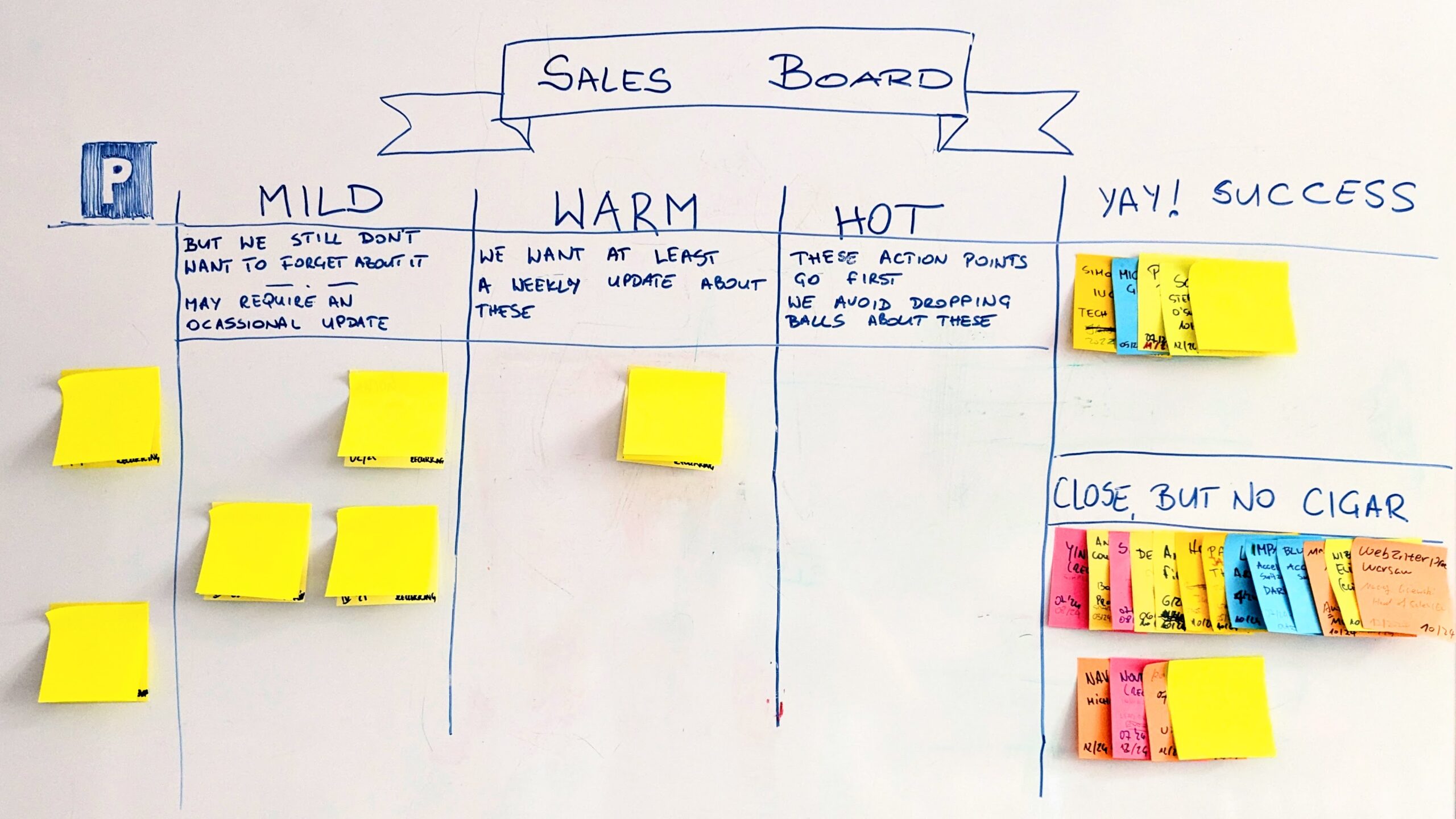
    One such example is our sales board.

    visual board sales process

    Over the years, we’ve tried different tools to manage our sales prospects. We’ve tried anything from Trello to Salesforce (BTW, Trello was actually pretty good).

    And yet, after another frustrating event when something “fell off the table” yet again, I suggested scratching the digital tools. We repurposed one of the whiteboards as our sales activities HQ.

    I lived happily ever after.

    Physical Board in Digital World

    We don’t have the comfort of having everyone at the office all the time. Over the time the board has been in place, we have had people involved living in different cities.

    Still, we arrange to meet at least weekly in the same room.

    “But Pawel, it means that you can reliably update the board only once a week!”

    More frequently, in fact, but that’s correct. We can’t rely on it being up-to-date every single day.

    The thing is, it doesn’t matter.

    The activities we track don’t have an hourly rhythm that many software development teams experience. There aren’t that many active items on the board, either.

    A side note: The picture shows the actual state, although I obfuscated the names on post-its with fancy technology (more post-its).

    Flexibility of Physical Boards

    I like this example as it shows several advantages of using a whiteboard populated with sticky notes.

    Defining the Workflow

    While the structure of the board is nothing fancy, there are a couple of things that we get for free on a whiteboard, while they would be a pain in a digital tool.

    • The middle section (mild/warm/hot) is a subflow. And not even a real flow, as items freely travel between all three stages. The overarching flow is: parking, the middle section, and the virtual ‘done’ column. Most work just doesn’t flow linearly from one JIRA column to another.
    • The ‘done’ column has two possible outcomes (success/failure), but we cut the column vertically. Anyone want to take a shot at which outcome is more desirable (even without reading the labels)?
    • We added vividly visible definitions of key columns. All the important information is there, in front of anyone’s eyeballs.
    • My favorite: with sticky notes, color-coding is painfully obvious. And yes, color coding is still screwed up in just about any digital tool out there.

    By the way, there’s a reason why we split the middle section vertically while the done column horizontally. The mild/warm/hot part follows the behavior of “reading from the right,” where whatever is closer to being done also gets priority attention.

    The rightmost column presents a simple differentiator of the outcome. There’s no immediate stuff to do with the items in there.

    We handle items in different sections of the board differently, and the design reflects that.

    Data on Index Cards

    Over time, we began adding various data to individual index cards.

    sticky notes on sales visual board

    There are lead times (which we measure in months, by the way), sources of contact, etc. However, we could define all of this as custom fields on a digital board.

    The interesting part is that we add whatever random bits of information are crucial. But only crucial. No wall of text with the summary of the last call with a potential client.

    Why? Because there’s not enough space to slap everything there. Thus, the constraint serves as a filter.

    The Overview

    That’s by far the most essential part. With just a rudimentary understanding of the columns and post-its colors, you could easily assess what’s happening in the whole sales process.

    Having an opportunity to glance at the board when we come back to our desks with coffee serves as a trigger to follow up on whatever we forgot about. We can nudge another person to ask about their task simply because we notice it accidentally.

    It’s this helicopter view that’s almost nonexistent in digital tools. And when it is, it typically is another dedicated view that one has to check explicitly.

    This kind of serendipitous information consumption happens almost exclusively with physical visualizations.

    A Love Letter to Physical Boards

    The tradeoff we make between digital and physical boards is not only about convenience. It’s also about how we engage with information.

    It’s obvious when you think about it. Tonianne observes:

    “It’s worth noting that our spatial memory and systems thinking abilities evolved in the physical world.

    We are genetically wired to use physical visualizations. It’s no wonder they serve us better in a broader range of contexts.

    Yes, there are situations when we want or need to focus on only a short list of a few tasks that are assigned to us. It’s just an infrequent occurrence when it’s the most effective choice for the team.

    So, treat it as my love letter to physical boards. Like any other person, I use digital tools a lot. I have to. No matter how hard I try, my whiteboard won’t be useful to a client in New York.

    Yet, there are many situations where the simplest old-school visualizations are feasible. And when they are, they are bound to beat the crap out of digital tools.


    The inspiration for this post came from our discussion with Tonianne DeMaria and Jim Benson (of Personal Kanban fame) on Substack, where they’ve recently started publishing. If any of the above considerations sounds interesting, I recommend subscribing to their newsletter.

  • Reinvent Your Daily Meetings

    Reinvent Your Daily Meetings

    Are you still doing daily meetings in the format suggested by Scrum? The three famous questions:

    1. What did you do yesterday?
    2. What are you going to do today?
    3. Are there any obstacles?

    Do yourself a favor and stop.

    It might have been a useful practice two decades ago. But it is not anymore. Not in that form.

    The Old Cure

    Here’s the thing. The ideas behind Scrum date as far back as the 80s, and its first applications happened in the 90s. Yes, it’s that old. But that itself doesn’t deserve criticism.

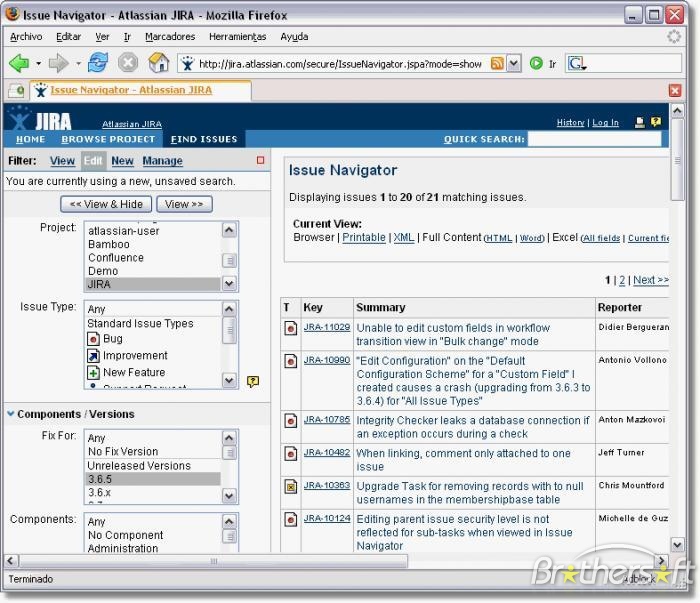
    However, when you look at the 2000s, when Scrum got its prominence, your average team’s tooling looked very different. The visual boards were yet to become popular. The state-of-the-art task management system was a filtered list.

    Jira dashboard from the 2000s

    No one in the IT industry seriously talked about limiting WIP then, so we were drowned in an excessive amount of ongoing tasks. That made navigating long, long lists of work items even more of a maze from nightmares.

    It’s no wonder that people saying what they were doing yesterday and what they plan to do today was a refresher.

    The New Situation

    Fast forward 10 years, and teams suddenly have very readable visual boards as a standard practice. Limiting work in progress may still be a challenge, but we’ve gotten progressively better.

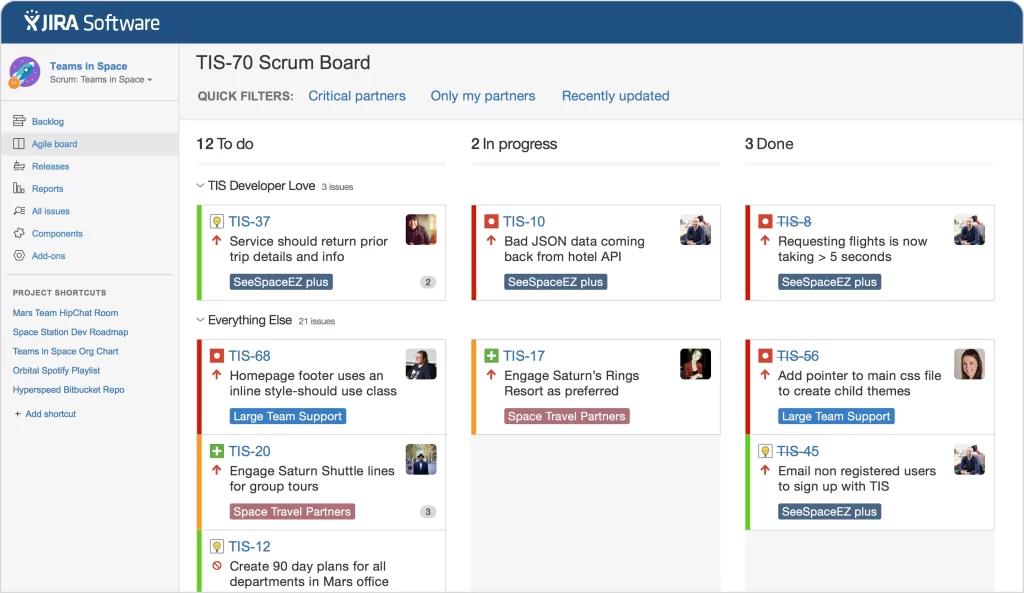
    Also, new visualization standards allow for better comprehension of whatever is in flight. Even Jira caught up.

    Jira visual board from the 2010s

    As long as:

    • the board is up to date
    • there’s even remotely reasonable amount of work in progress

    we can clearly see who’s doing what.

    How? Just look at the board—it’s all there; thank you very much.

    And if, by any chance, the board would suggest that a person still works on 5 different things, then it’s not the form of the daily meetings that is the main problem.

    Who Cares?

    If you still think the old form of the daily updates makes any sense, look at people’s engagement during them. There’s precisely one person who’s interested in the entirety of the updates.

    The Scrum Master.

    For the rest of the team, it’s a ritual they follow out of habit. At best, they are interested in what a couple of people working on the most related tasks are doing, and then they’re off again.

    So it’s like a theater with many actors and just one attendee (the Scrum Master).

    It’s even worse. Almost all that information is readily available on the visual board. So that one person could have gotten it without getting everyone involved.

    Not Just a Status Update

    That’s the point where people tell me that I describe a daily meeting as a glorified status update, which it wasn’t meant to be.

    Fair enough. So what is it?

    A way for a remote team to get together and gel? Fine, get together and gel. I doubt that answering who does what is the best way to do it.

    So, maybe, it’s a place where we discuss obstacles and problems. Fantastic! That’s actually the only original question that is still useful. Then, ask only that bloody question and be done with it.

    Whatever the purpose of the meeting is, name it. I bet there’s a better format to address that very purpose.

    And yet, in 2025, people will still answer those three questions invented three decades ago.

    Daily Around the Board

    The intention behind the original standup format was a team sync-up. That goal is still worth pursuing. However, we have options that weren’t available a quarter of a century ago.

    My default way of running dailies relies on four elements:

    • We use blockers extensively to show any impediments
    • We keep the visual board up to date (it’s “the single source of truth”)
    • We run dailies around the board
    • We read the board from right to left (or from most to least done) and focus purely on blockers

    That’s it. It’s enough to focus on the important stuff. The rest is business as usual and not worth mentioning.

    You can easily cut the daily meeting time by half (or more), make it more engaging, and (a bonus) use it as an encouragement to keep the board up to date.

    There’s literally no coming back.

    The Purpose

    Sadly, we still stick to practices. They might have been visionary decades back, but somehow, we stopped asking about their purpose and blindly stuck to them.

    If we did, we would challenge many of the techniques we use.

    Ask yourself this question: If Agile were invented today, what practices would it devise? It would most definitely be different from what you’d find in a Scrum Guide.

    So do yourself a favor, stop answering the three standup questions, and, for a change, start using this daily hangout to make something useful.

    That’s what Agile intended us to do, after all.

  • Milk Kanban

    Milk Kanban

    When people say Kanban, they tend to think of a specific set of practices. Whiteboards & sticky notes (both almost universally virtual). Tasks moving through columns that represent workflow. Every now and then, WIP limits even.

    As often as we do it with other things, it reduces a broader principle to a set of oversimplified techniques, which, in turn, tend to underdeliver in many contexts.

    Kanban

    In its original meaning, Kanban represented a visual signal. The thing that communicated, well, something. It might have been a need, option, availability, capacity, request, etc.

    In our Kanban systems, the actual Kanban is a sticky note.

    It represents work, and given its closest environment (board, columns, other stickies, visual decorators), it communicates what needs, or needs not, to be done.

    If it’s yellow, it’s a regular feature. If there’s a blocker on it, it requests focus. If there’s a long queue of neighbors, it suggests flow inefficiency. If it’s a column named “ready for…” it communicates available work and/or handoff.

    A visual signal all the way.

    Visual Signals

    Let’s decouple ourselves from the most standard Kanban board design. Let’s forget columns, sticky notes, and all that jazz.

    Enters Kasia, our office manager at Lunar. One of the many things Kasia takes care of is making sure we don’t run out of kitchen supplies. The tricky part is that when you don’t drink milk yourself, it becomes a pain to check the cupboard with milk reserves every now and then to ensure we’re stocked.

    Then, one day, I found this.

    A simple index card taped to the last milk carton in a row stating, “Bring me to Kasia.” That’s it.

    In the context, it really says that:

    • we’re running out of (specific kind of) milk
    • we want to restock soon
    • there’s enough time to make an order (we don’t drink that much of cappuccinos and macchiatos)

    But it’s just a visual signal. Kanban at its very core.

    Simplicity is the King

    What Kasia designed is a perfect Kanban system. It relies on visual signals, which are put in the context. Even better, unlike most Kanban boards I see across teams, the system is self-explanatory. Everything one needs to know is written on the index card.

    That’s, by the way, another characteristic of a good Kanban system. It should be as simple as possible (but not simpler). Our workflow representations tend to get more and more complex over time by themselves; we don’t need to make them so from the outset.

    It’s a safe assumption that, almost always, there’s a simpler visualization that would work just as well. We, process designers, often fall into the trap of overengineering our tools.

    And it’s a healthy wake-up call when someone who knows close to nothing about our fancy stuff designs a system that we would unlikely think of. One that is a perfect implementation of the original spirit, even if it doesn’t follow any of the common techniques.

    Because it’s all about principles, not practices.

    That’s what we can learn from Milk Kanban.

  • Portfolio Management: Role of Autonomy

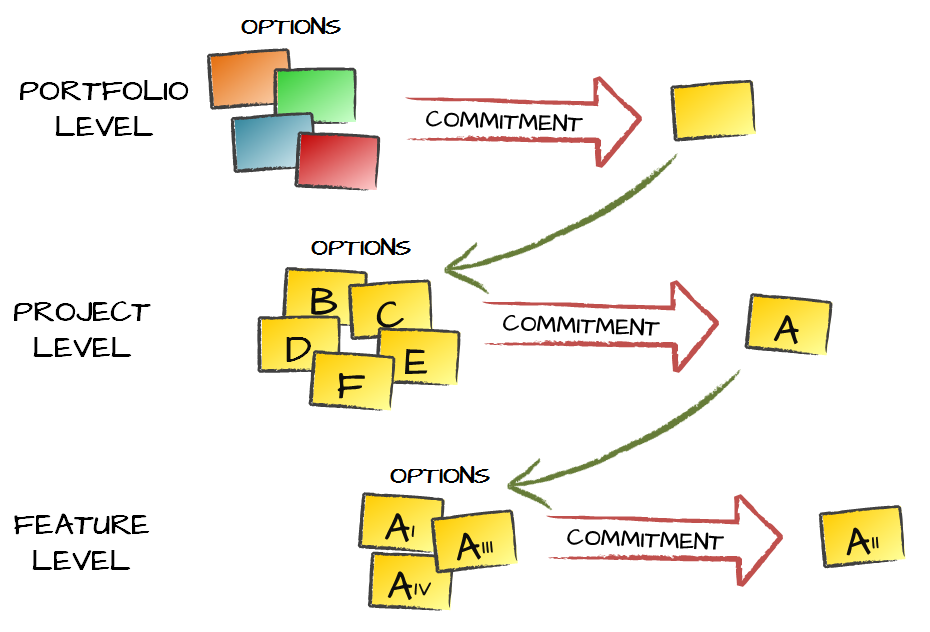
    I’m a huge fan of Real Options. Along with Cynefin, it is one of the models that can be very universally applied in different domains. No wonder that some time ago I proposed application of Real Options as a sense making mechanism that connects different levels of work being done in an organization.

    Simply put, potential work, be it projects or products, are options. We rarely, if ever, can effectively work on all the potential initiatives we have on our plates. That’s why we end up picking, a.k.a. committing to, only a subset of options we have.

    Each commitment to start an initiative instantly generates a set of options on a lower level of work. Once we commit to run a project there are so many ways we can structure the work and so many possible feature sets that we can end up building. We again have a set of options available and again eventually commit to execute some of them. That in turn generates the options on a layer or finer granularity work items, say individual features. It goes all the way down to the most atomic work items we have.

    Portfolio Management Real Options

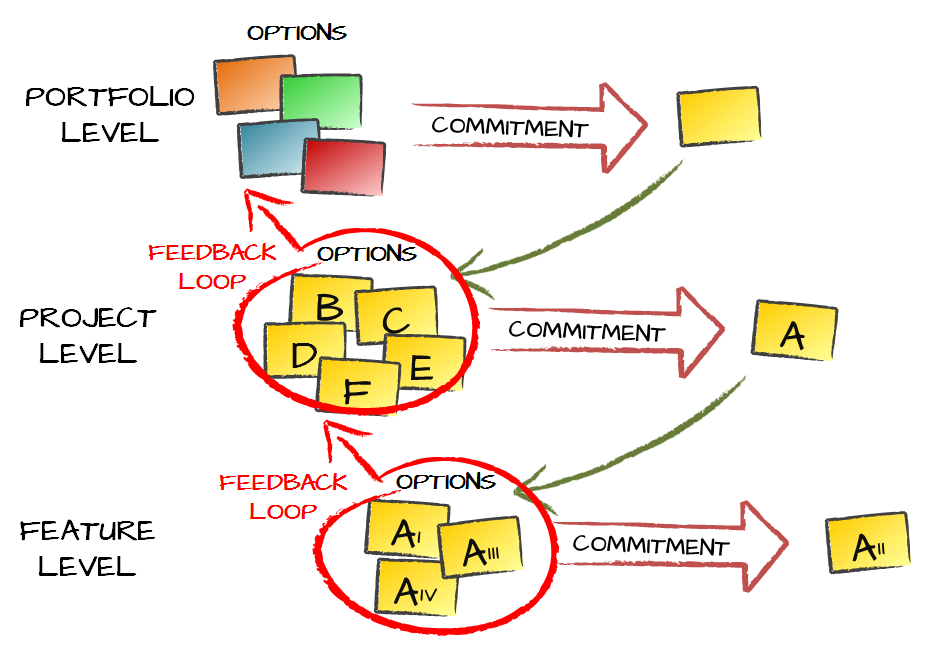
    We need an accompanying mechanism to close a full feedback loop between the layers of work. We simply need to provide information back to the higher level of work. Think of situations like a project taking longer than expected. We obviously want that information to be taken into account when we are making commitments on a portfolio level. Ultimately, it means that available capabilities have changed and thus it influences the set of options we have on a portfolio level.

    Again, the similar dynamics will be seen between any of the two neighboring layers of work. Specific technical choices for features will influence how other features are built or how much time we’d need to make changes in a product.

    Portfolio Management Real Options

    The model can be easily scaled up to reflect all the layers of work that are present in an organization. In big companies there will be multiple layers of work even in the area of portfolio management only.

    The underlying observation is that we very, very rarely need information to be escalated farther than between neighboring levels of work. In other words a single feature that is late will not affect decision-making process on portfolio level. By the same token commitment to start a new project, as long as it takes into account available capabilities, will be of little interest to a feature team involved in an ongoing initiative.

    There is, however, one basic assumption that I subconsciously made when proposing this model. The assumption is about autonomy.

    Work flows down to the finer-granularity level is through a commitment at a coarser-granularity level. The commitment, however, is not only expressing good will that we want to build something. If we make a commitment to run a project we need to fund and staff it. The part of the commitment is providing people, skills and resources required to accomplish that project within expected constraints, be it time, budget, scope, etc.

    If there are other constraints that are important they need to be explicitly described once the commitment is being made. One example that comes to my mind would be around the ultimate goals for a product or a project. It can be about technical constraints – for whatever reasons technologies that a product will be built in may be fixed. Another common case would be about high level dependencies, e.g. between two interconnected systems.

    Such constraints need to be explicit and need to be expressed when the commitment is being made simply because they influence what options we will have in the lower level of work.

    There’s also another important reason why we want explicit constraints. When we move our perspective to a different level of work we also change the team that is involved in work. In the most common scenario the team context will change from PMO, through a project team to a feature team as we go down through the picture.

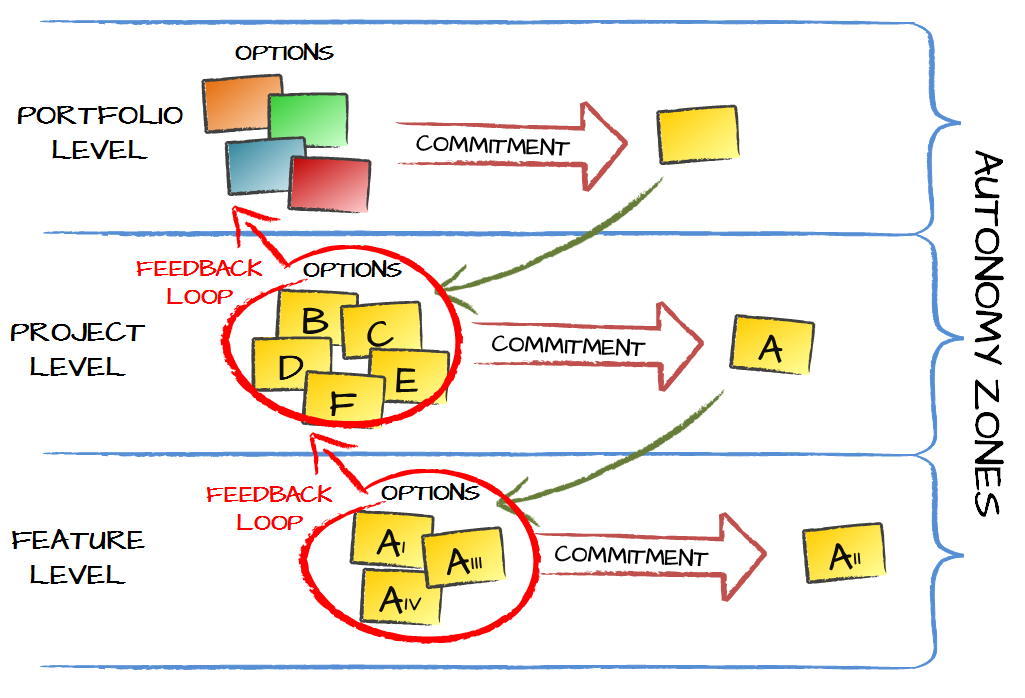
    And that’s exactly when autonomy kicks in. Commitment on a higher level of work generates options on a lower level. What kind of options we get depends on the constraints we set. These are all prerogatives of a team making decisions on a higher level.

    The specific choice among the available options, on the other hand, is responsibility of a team that operates on a lower level.

    Obviously, we don’t want PMO leader to tell developers how to write unit tests. That’s the extreme example though and I see violation of autonomy all over the place.

    Let’s start from the top. The role of PMO in such a scenario would be to pick initiatives that we want to run, a.k.a. make project- or product-level commitments. The part of the process would be defining relevant constraints for each commitment. These would be things like manning and funding the new initiative, sharing expectations deadlines, etc. This is supposed to provide fair amount of predictability and safety to the team that will be doing the actual work.

    One crucial part of defining constraints is making the goals of the initiative explicit. What we are trying to achieve with this product or project. In other words why we decided to invest time of that many people and that much money and we believe it was a good idea.

    And now the final part. Then PMO should get out of the way. Options are there in a product team or a project team. That team should have autonomy to pick the ones they believe are the best. Interference from the top will disable autonomy and as such will be a source of demotivation and disengagement. It is very likely that such interference would yield suboptimal choice of options too.

    The pattern remains the same when we look at any two neighboring layers of work. For example, we will see similar dynamics between a product team and a feature team.

    Portfolio Management Real Options Autonomy

    The influence on which options get executed happens through definition of constraints and not by enforcing a specific choice of options. Those different levels of work are, in a way, isolated between each other by the mechanism of commitment that yields options on a lower level, feedback loops going up and finally by distributing authority and maintaining autonomy to make decisions within own sphere of influence.

    Unsurprisingly the latter gets abused fairly commonly, which is exactly why we need to be more aware and mindful about the issue.

  • Don’t Limit Work in Progress

    I’m a long-time fan of visual management. Visualizing work helps to gather low-hanging fruits: it makes the biggest obstacles instantly visible and thus helps to facilitate the improvements. By the way, these early improvements are typically fairly easy to apply and have big impact. That’s why we almost universally propose visualization as a practice to start with.

    At the same time a real game-changer in the long run is when we start limiting work in progress (WIP). That’s where we influence the change of behaviors. That’s where we introduce slack time. That’s where we see emergent behaviors. That’s where we enable continuous improvements.

    What’s frequently reported though, is that introducing WIP limits is hard for many teams. There’s resistance against the mechanism. It is perceived as a coercive practice by some. Many managers find it really hard to go beyond the paradigm of optimizing utilization. People naturally tend to do what they’ve always been doing: just pull more work.

    How do we address that challenge? For quite some time the best idea I’ve got was to try it as an experiment with a team. Ultimately there needs to be team buy-in to make WIP limits work. If there is resistance against a specific practice, e.g. WIP limits, there’s not much point in enforcing it. It won’t work. However, why not give it a try for some time? There doesn’t have to be any commitment to go on after the trial.

    The thing is that it usually feels better to have less work in progress. There’s not that much of multitasking and context switching. Cycle times go down so there’s more of sense of accomplishment. The pressure on the team often goes down as well.

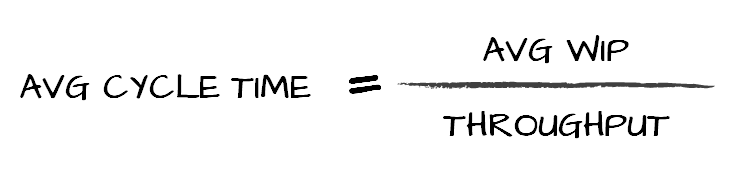
    There’s also one thing that can show that the team is actually doing much better. It’s enough to measure start and end dates for work items. It will allow to figure out both cycle times (how much time it takes to finish a work item) and throughput (how many work items are finished in a given time window).

    If we look at Little’s Law, or rather its adoption in Kanban context, we’ll see that:

    Little's Law

    It means that if we want to get shorter cycle time, a.k.a. quicker delivery and shorter feedback loops, we need either to improve throughput (which is often difficult) or cut work in progress (which is much easier).

    We are then in a situation where we understand that limiting WIP is a good idea and yet realize that introducing such a practice is not easy. Is there another way?

    One strategy that worked for me very well over years was to change the discussion around WIP limits altogether. What do we expect when WIP limits are in place? Well, we want people to pull less work and instead to focus on finishing items rather than starting them.

    So how about focusing on these outcomes? It’s fairly simple. It’s enough to write a simple guidance. Whenever you finished work on an item first check whether there are any blockers. If there are attempt to solve them. If there aren’t any look at any unassigned items starting from the part of the board that’s closest to the done column (typically the rightmost part of the board). Then gradually go toward the beginning of value stream. Start a new item only when there’s literally nothing you can do with ongoing items.

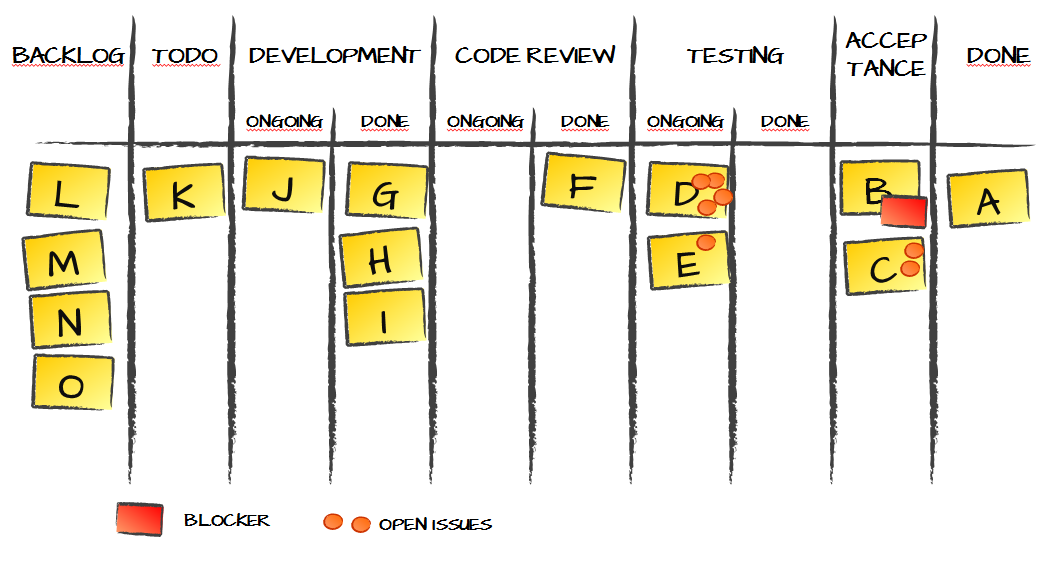
    Kanban Board

    If we took a developer as an example the process might look like this. Once they finish coding a new work item they look at the board. There is one blocked item. It just so happens that the blocker is waiting for a response from a client. A brief chat in the team may reveal that there’s no point in pestering the client for feedback on the ticket for now. At the same time it may be a good time to remind the client about the blocker.

    Then the developer would go through the board starting at the point closest to the doneness. If the process in place was something like: development, code review, testing and acceptance by the client, the first place would be acceptance. Are there any work items where the client shared feedback, i.e. we need to implement some changes? If so that’s the next task to focus on. In fact, it doesn’t matter whether the developer was the author of the ticket but if there are any tickets that used to be his it may be input for prioritizing.

    If there’s nothing to act upon in acceptance, then we have testing. Are there any bugs from internal testing than need to be fixed? Are there any tickets that wait for testing that the developer can take care of? Of course we have a century-old discussion about developers not willing to do the actual testing. I would however point that fixing bugs for the fellow developers is equally valuable activity.

    If there’s nothing in testing that can be taken care of then we move to code review and take care of anything that’s waiting for code review or implement feedback from code review that’s been done already.

    Then we move to development and try to figure out whether the developer can help with any ongoing work item. Can we pair with other team members? Or maybe there are obstacles where another pair of eyes may be useful?

    Only after going through all the steps the developer moves to the backlog and pulls a new ticket.

    The interesting observation is that in vast majority of cases there will be something to take care of. Just try to imagine a situation where there’s literally nothing that’s blocked, requires fixing or improvements and nothing that’s in waiting queue. If we face such a situation we likely don’t need to limit work in progress any further.

    And that’s the whole trick. Instead of introducing an artificial mechanism that yields specific outcomes we can focus on these outcomes. If we can guide the team to adopt simple guidance for choosing tasks we effectively made them limit work in progress and likely with much less resistance.

    Now does it matter that we don’t have explicit WIP limits? No, not really. Does it matter that the actual limits may fluctuate a bit more than in a case when the process has hard limits? Not much. Do we see actual improvements? Huge.

    So here’s an idea. Don’t focus on practices. Focus on understanding and outcomes. It may yield similarly good or better results and with a fraction of resistance.

  • Context Switching: The Good and the Bad

    Multitasking is bad. We know that. Sort of. Yet still, we keep fooling ourselves that we can do efficiently a few things at the same time.

    When I talk about limiting work in progress I point a number of reasons why multitasking and its outcome – context switching – is harmful. One of them is Zeigarnik Effect.

    Zeigarnik Effect is an observation that our brains remember much better tasks that we haven’t finished. Not only that though. If we haven’t finished something we will also have intrusive thoughts about that thing.

    So it’s not only that it’s easy for us to recall tasks that we haven’t finished. We don’t necessarily control that we occasionally think about these tasks either.

    What are the consequences? Probably the most important outcome is that, in a situation where we handle a lot of work in progress, it is an illusion that we are focusing on a single task. This is an argument that I’d frequently hear: it doesn’t matter that we have a dozen work items in development. After all, at any given time I only work on a single feature, right?

    Wrong. What Zeigarnik Effect suggests is that our brains will be switching context despite what we consciously think it would do.

    An interesting perspective to that discussion is that Zeiganik effect has been disputed – it isn’t universally accepted phenomenon. Let me run a quick validation with you then. When was the last time that, while doing something completely different, you’ve had an intrusive thought about an unfinished task. Be it an email you forgot to send, a call you didn’t make, a chore you was supposed to do or whatever else.

    We do have those out of the blue thoughts, don’t we? Now, think what happens when we do. Our brain instantly switches the context. It doesn’t really matter what we’ve been doing prior to that: driving a car, coding or having a discussion.

    That’s exactly where the multitasking tax is rooted.

    It’s not all bad though. We frequently use Zeigarnik Effect to help us. A canonical example is when we struggle with solving a complex issue, we give up, just to figure it all out when we take shower, brush our teeth or just lay in bed after we’ve woken up in the morning. We simply release the pressure of sorting it all out instantly and let our brain take care of that.

    And it does. On a moment that’s convenient for our thinking process we face a context switch that brings us to a solution of a puzzle that we’ve been facing.

    It is worth to remember that it’s a case of context switching as well. It just so happens that we’ve been taking a shower thus it doesn’t hit our productivity. The pattern in both cases is exactly the same though.

    That’s why it is worth remembering that adding more and more things to our plate doesn’t make us effective at all. At the same time we may use exactly the same mechanism to let our brain casually kick in when we struggle with solving a difficult problem.

  • Portfolio Kanban Board

    One thing that I learned quickly when I started experimenting with Portfolio Kanban is that a classic, flow-driven board design isn’t particularly good in vast majority of cases.

    Board Designs

    Long story short, I ended up redesigning the board structure completely and it worked much better. In fact, it worked so well that I started proposing such a design as a starting point whenever working with portfolio Kanban.

    Portfolio Kanban Board

    Interestingly enough, as Kanban adoption of portfolio level progressed I started seeing completely different approaches to visualization. Not that they were worse. They just focused on different aspects of work.

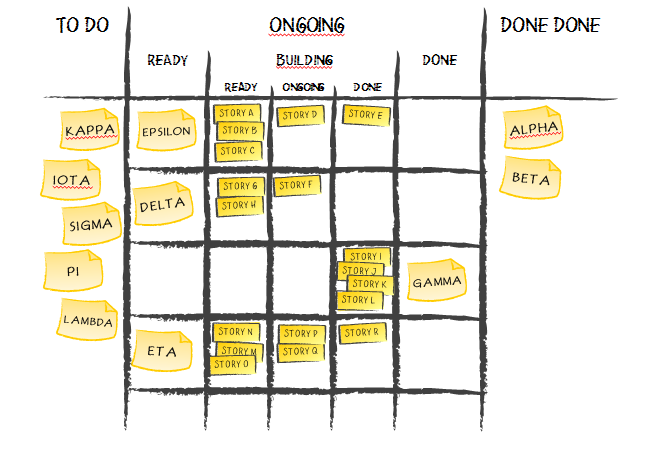
    One that popped up early was two-tier board that addresses different granularity of tasks at the same board. We can track the roots of this design to David Anderson’s time at Corbis. Since then it was picked up to manage portfolios.

    Portfolio Kanban Board

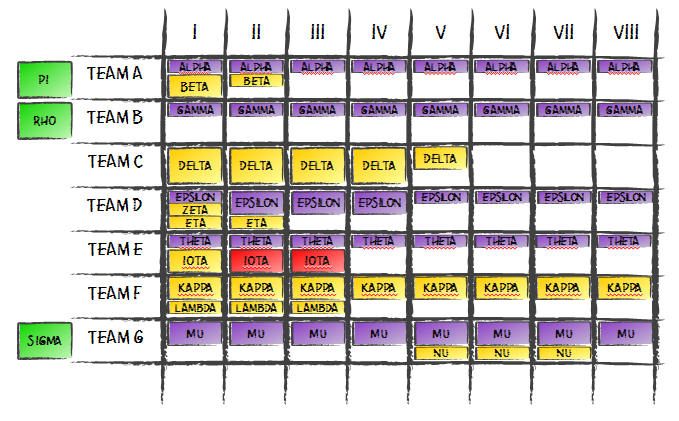
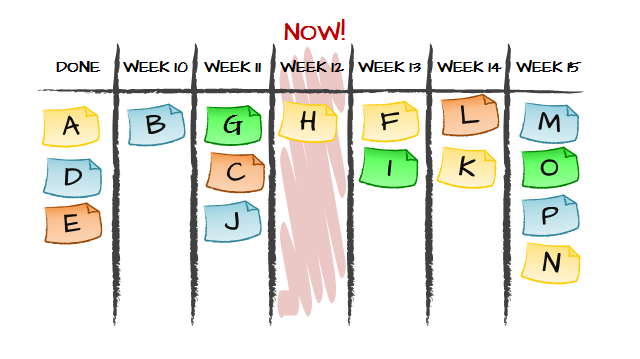
    Another example came from Zsolt Fabok, who was inspired by Chris Matts. What he proposed was a board that stresses expected delivery dates and how an organization is doing against these dates. Again the board design is completely different from the ones we’ve seen so far.

    Portfolio Kanban Board

    Another interesting example that I like is a portfolio board that visualized non-homogenous flow of work. This still is one of the most unusual board designs I’ve seen and yet it makes a perfect sense given the context.

    Portfolio Kanban Board

    By that time it was perfectly clear that there is no such thing as a standard design of Portfolio Kanban board. Each of these designs was fairly optimal if we considered the context. At the same time each of the boards was designed to stress a different aspect of work.

    The design I ended up with in my Portfolio Kanban story revolved around available capabilities and commitments. The two-tiered board design focused on flow of coarse-grained items and breaking work down to fine grained items. The deadline driven board based on an assumption that the most critical aspect of work are delivery dates and monitoring delays. Finally, non-homogenous flow board design addressed the issue of different flows of work in each of the projects.

    Which design is most useful then? It depends. To address that question we first need to answer which aspect of our work is the most important to track on a regular basis. To get that answer we need to discuss risks.

    Risk Management

    Obviously, risk management is a multi-dimensional issue. Some dimensions would be more interesting than others. The word “interesting” typically translates to the fact that we are more vulnerable to a specific class of risks or that we are doing especially badly against managing that class of risks.

    A typical example in the context of portfolio management would be overburdening. We commit to more projects or products than we can chew. We end up having our teams juggling all the concurrent endeavors. As a result we see a lot multitasking, context switching, and huge inefficiencies.

    In such a case the most interesting dimension of risks would be one related to managing available capabilities and ongoing commitments. And that would exactly be information that we’d like to focus on most when designing Portfolio Kanban board.

    That’s by the way almost exactly the process I went through when I proposed capability-focused board design. Of course, back then the thought process wasn’t that structured and it was more trial and error.

    There are some additional aspects of the story, like the huge variability of size of the projects that we typically see. This would affect the details of the board design as well. In this case relative size is visualized as well.

    The most important bit is that we start with the most important risk dimension. This should define the whole structure of Portfolio Kanban board.

    Coming back to different visualizations I mentioned we can easily figure out what was the key class of risks in each design.

    In two-tiered board the biggest concern was smooth flow of coarse-grained items (feature sets). We can also figure out that variability in size of feature sets wasn’t that much of a problem. Given that we’re talking about product development organization and that they are in full control of how they define feature sets, it does make a lot of sense.

    Delivery date driven board stressed how important risks related deadlines and timeliness of delivery were. We may also notice that there isn’t much stress on flow of work and not that much focus on addressing potential overburdening either.

    The design with non-homogenous flow, as its name suggests, pinpoints that most important risk dimension was managing flow. On the other hand risks related to capability management and overburdening don’t seem so important.

    Optimal Design

    The structure of Portfolio Kanban board can show only that much. We can’t visualize all the risk dimensions using the board structure alone. David Anderson in his Enterprise Service Planning talk points that it is common that organizations track 4-8 different dimensions of risks. The board design can address one or two.

    Make it the two that matter most.

    Where would others go? Fortunately we still have items on our board, whatever we decide them to be. We can track information relevant for other risk dimensions using information on index cards. The design of the items on the board is no less important than the design of the board itself.

    Designing Portfolio Kanban board is not an obvious task. We don’t even have a standard approach – something similar to a flow-based design we commonly use on a team level. Understanding how we manage risks is the best guidance that can lead to fairly optimal board design quickly.

    Of course one alternative is to go through a trial and error process. Eventually you’d land with similar outcomes. A quicker way though is to start with understanding risks.