Category: project management

  • Splitting Huge Tasks

    On occasions I deal with an issue small enough that it barely deserves a full-blown blog post, yet it is hard to pack it into 140 characters of a tweet. However, when I’m advising on such an issue for yet another time it is a clear signal that sharing an idea how to deal with it might be useful. So, following an experimentation mindset, I’m going to try short posts addressing this kind of issues and see how they are received.

    One of pretty common problems is with splitting tasks. For example a typical task for a team can take something between 4 hours and a couple of days. And then, there is this gargantuan task that takes 3 months. Actually, 3 months, 5 days and 3 hours. It is, however, quite a coherent work item. Basing on merits it does make sense to treat it as a single task.

    On a side note: for whatever reasons it happens more often in non-software development teams.

    The problem is, it heavily affects any metrics you may gather. Sometimes it affects metrics to the point when analyzing them doesn’t make much sense anymore. If you include this huge task in your metrics they all go mad. If you don’t, you basically hide the fact that a part of the team was working on something that isn’t accounted at all. So the question is: should you accept it and move on or do something with the task?

    I’m not orthodox but I’d rather split the task to smaller ones. Usually this is the point when new issues raise – for example the task can be split but for pieces so small that measuring them separately adds way too much hassle. An alternative can be grouping these tiny pieces into batches of a size that does make sense for the team.

    Anyway, I’d still go with splitting the task, even if division is artificial to some point. The knowledge you gain from metrics is worth the effort.

    In short: when in doubt – split.

  • Cadences and Iterations

    Often, when I’m working with teams that are familiar with Scrum, they find the concept of cadence new. It is surprising as they are using cadences, except they do it in a specific, fixed way.

    Let’s start from what most Scrum teams do, or should do. They build their products in sprints or iterations. At the beginning of each sprint they have planning session: they groom backlog, choose stories that will be built in the iteration, estimate them etc. In short, they replenish their to do queue.

    When the sprint ends the team deploys and demos their product to the client or a stakeholder who is acting client. Whoever is a target for team’s product knows that they can expect a new version after each timebox. This way there is a regular frequency of releases.

    Finally, at the very end of the iteration the team runs retrospective to discuss issues and improve. They summarize what happened during the sprint and set goals to another. Again, there is a rhythm of retrospectives.

    Then, the next sprint starts with a planning session and the whole cycle starts again.

    It looks like this.

    All practices – planning, release and retros – have exactly the same rhythm set by the length of timebox. A cadence is exactly this rhythm.

    However, you can think of each of practices separately. Some of us got used to the fact that frequency of planning, releases and retrospectives is exactly the same, but when you think about this it is just an artificial thing introduced by Scrum.

    Would it be possible to plan every second iteration? Well, yes, why not? If someone can tell in advance what they want to get, it shouldn’t be a problem.

    Would it be a problem if we had planning more often then? For many Scrum teams it would. However, what would happen if we planned too few stories for the iteration and we would be done halfway through the sprint? We’d probably pull more stories from backlog. Isn’t that planning? Or in other words, as long as we respect boundaries set by the team, wouldn’t it possible to plan more frequently?

    The same questions you can ask in terms of other practices. One thing I hear repeatedly is that more mature teams change frequency of retrospectives. They just don’t need them at the end of every single sprint. Another strategy is ad-hoc retro which usually makes them more frequent than timeboxes. Same with continuous delivery which makes you deploying virtually all the time.

    And this is where the concept of cadence comes handy. Instead of talking about a timebox, which fixes time for planning, releases and retrospectives, you start talking about a cadence of planning, a cadence of releasing and a cadence of retrospectives separately.

    At the beginning you will likely start with what you have at the moment, meaning that frequencies are identical and synchronized. Bearing in mind that these are different things you can perfectly tweak them in a way that makes sense in your context.

    If you have comfort of having product owner or product manager on-site, why should you replenish your to do queue only once per sprint? Wouldn’t it be better if the team worked on smaller batches of work, delivering value faster and shortening their feedback loops?

    On the other hand, if the team seems mature frequency of retros can be loosened a bit, especially if you see little value coming out of such frequent retros.

    At the same releases can be decided ad-hoc basing of value of stories the team has built or client’s readiness to verify what has been built or on weather in California yesterday.

    Depending on policies you choose to set cadences for your practices it may look like this.

    Or completely different. Because it’s going to be adjusted to the specific way of working of your team.

    Anyway, it is likely, that the ideal cycle of planning, releases and retrospectives isn’t exactly the same, so keeping cadences of all of these identical (and calling them iteration or timebox) is probably suboptimal.

    What more, thinking about a cadence you don’t necessarily need them to be fixed. As long as they are somewhat predictable they totally can be ad-hoc. Actually, in some cases, it is way better to have specific practice triggered on event basis and not on time basis. For example, a good moment to replenish to do queue is when it gets empty, a good moment to release is when we have a product ready, which may even be a few times a day, etc.

    Note: don’t treat it as a rant against iterations. There are good reasons to use them, especially when a team lacks discipline in terms of specific practices, be it running retros or regular deployments. If sprints work for you, that’s great. Although even then running a little experiment wouldn’t hurt, would it?

  • Trap of Estimation

    So we had this project which was supposed to end by the end of July. Unfortunately a simple burnup chart, which we used to track progress, seemed rather grim – it was consistently showing very beginning of September as a completion date. A month late.

    Suddenly, one day it started looking almost perfectly – end of July! Yay!

    Wait, wait, wait. What? I mean, what the hell happened on a single day that we suddenly recovered from a month-long slip? Something stinks here.

    After a while of digging we came up with the answer. Actually team invested some time to re-estimate all the work, including the work which was already done. Now, how the heck does it affect burnup chart?

    It seems the chart on the y axis, where the work items were shown, had a sum of estimates and not just a number of tasks. It means that changing estimates in retrospect affects the scope and percent complete of the project. It actually means that such changes can affect predicted completion date as well.

    This is called creative accounting and some people went to jail because of that, you know.

    My first question is whether such re-estimation changes real status of a project in terms of how much functionality is ready, what is done, how many bugs are fixed or lines of code written or any other creative, crazy or dumb measure you can come up with to say how much work has been done. Or does it change how much more work is there to be done?

    No! Double no, actually. It’s just a trick to tell us we aren’t screwed up that much. Actually, I accept the fact that we might have been OK in the first place and the chart was wrong. That would be awesome. But fixing the chart in such way, one, doesn’t change the status of work in any way and, two, just covers the real issue so it is harder to address it.

    What is the real issue then? Well, there are a couple of them. First, using time-based estimates to show how much work is to be done is asking for troubles. Unless you are a freaking magician and you can make your estimates right 5 months before you even start working on the task, that is. If you’re just a plain human, like me, and you assume your estimates are wrong using them as a basis for tracing project progress seems sort of dumb to me.

    It would be much better to count features or, if they vary much in size, count weight of features. Say S size is 3 times smaller than M and this is 3 times smaller than L or something like this. By the way, as you gather historical data you can pretty much fix these factors learning from past facts.

    Second, even if you decided to go with estimates to judge how much work is to be done, what makes you thinking that fixing estimates in retrospect pushes you forward for an inch in terms of the next project you’re going to run? Do you expect to know exactly, in advance how much time will take you to build features in future projects? Because this kind of knowledge you’re applying now to “fix” your estimates in current project.

    I would rather prefer a discussion on how to judge the scope better at the beginning of projects because this is going to be your benchmark. In this case precise estimates are almost useless. I will likely be pretty close in terms of telling how many features we have to build. It’s going to be trickier to say which of them will be small, medium or large. But I refuse to guess how many freaking hours each and every feature will take to build because such effort is utterly futile. It just so happens that I’ve forgotten to take my damn crystal ball with me, so sorry, that’s not going to work.

    In this case estimation brings us to a trap. Knowing exactly how much time each work item has taken it is easy to track the progress in retrospect. Average 8-year old child would be able to connect the dots. However, unless you’re a bloody superhero and you’re going to have such data at the beginning of your next project don’t treat it as viable method of tracking progress.

    Use any data that will be available in high quality at the beginning of a project. Number of features, maybe sized in some way if your team have some experience in sizing and you understand variability of work.

    Anyway, whatever you do, just don’t change the benchmark in retrospect as it’s going to mess your data and cover a real problem, which is that you should improve the way you set the benchmark in the first place.

    By the way: if you happen to work on time and material basis you can perfectly ignore the whole post, you lucky bastard. Actually, I doubt you even reached to this point of the post anyways.

  • Slack Time

    It often comes to me as a surprise that people misunderstand different concepts or definitions that we use in our writings or presentations. Actually, it shouldn’t. I have to remind myself over and over again that I do exactly the same thing – I start playing with different ideas and only eventually learn that I misused or misunderstood some definitions.

    Anyway, the context that brought me to these thoughts is slack time. When talking about WIP (Work In Progress) limits we often mention slack time and usually even (vaguely) point what slack time is for. However, basing on different conversations I’m having, people rarely get what slack time is when they first hear about it.

    How Slack Time Works

    Let’s start with basics. Imagine a very simple development process: we have backlog which we draw features from, then development and testing and after that we are done. For my convenience I split development stage into two sub-columns: ongoing and done, so we know which task is still under development and which can be pulled to testing.

    As you might notice we also have WIP limits that will trigger slack time in our process.

    In ideal situation a quality engineer would pull tasks from development done sub-column as soon as anything pops there and even if it won’t happen immediately we have a buffer for one feature in development (two developers and WIP limit of 3 in the column). I have a surprise for you: we don’t live in ideal world and ideal situations happen pretty rarely.

    There are two scenarios possible here. One is that developers won’t be able to feed quality engineer with features at rate high enough to keep him busy.

    In this situation quality engineer is idle. He just face slack time. He can’t pull another task from queue because it is empty so he needs to find a different task. He may try to help developers with their work (if possible) but he may also learn something new using slack time to sharpen his saw. He can also use this time to automate some of his work (and believe me: vast majority apps I saw would benefit heavily from automating some tests) so that the whole process is more effective in future.

    Another situation, and the one that is more interesting, would happen when the quality engineer is a bottleneck. It means that he can’t deal with features built by developers at the same rate they are flowing through development.

    In this case one of developers who just finished working on a feature has slack time. It is possible that another will soon finish his feature as well and both will be in the same situation. And again, they can use slack time, e.g. to do some refactoring or learn something new or help quality engineer doing his work. However, probably most valuable and at the same moment most desirable thing to do would be finding a way to improve the part of the process that is bottlenecked; here: testing.

    The effect might be some kind of automated test suite that reduces effort needed to test any single feature or maybe improvements in code quality policies that result in fewer bugs, thus less rework for each feature.

    What Slack Time Is

    By this point you should already understand when slack time happens and what it is roughly. Let’s try to pack it into some kind of definition then. Slack time happens when any team member for whatever reasons restrains to do the task they would typically do, e.g. a developer doesn’t develop new features. It is used to do other tasks, that usually result in improvements of all sorts.

    That’s a bit simplified definition of course. You may ask what if a developer has a learning task every once in a while put into their queue. Well, I would dare to say that it is just planning for learning and not introducing slack time, but we don’t deal here with strict definitions so I could totally agree if others interpret it differently.

    Note: we went through two different root causes for slack time emergence. One is when there aren’t enough tasks to feed one of roles. This is something that happens pretty naturally in many teams. If one of roles further downstream is able to process more tasks than roles upstream (in other words: bottleneck is somewhere upstream) they will naturally have moments of slack time.

    Some people may argue that this is not slack time and again I can perfectly accept such point of view. However, for me it suits the definition.

    Another root cause is when we intentionally limit throughput upstream to protect bottleneck that is somewhere downstream. This case is way more interesting for a couple of reasons. First, it doesn’t happen naturally so conscious action is required to introduce such slack time. Second, for many people introducing slack time there is counterintuitive, thus they resist to do it.

    A result of not limiting throughput before a bottleneck is a huge queue of work waiting for availability of bottleneck role, which makes the whole thing only worse. The team has to juggle more tasks at the same time introducing a lot of context switching and crippling own productivity.

    Nature of Slack Time

    One of specific properties of slack time is its emergent nature. We don’t carefully plan slack time as we don’t exactly know when exactly it’s going to happen. It appears whenever our flow becomes unbalanced, which sometimes means all the time.

    You can say that slack time is some sort of flow self-balancing mechanism. Whenever team members happen to have this time while they don’t do regular work they are encouraged to do something that improves the flow in future, usually balancing it better. At the same time the more unbalanced the team and the flow are the more slack time there will be.

    Remember though that in software development business our flow won’t be stable. Even when you reach equilibrium in one moment it will likely be ruined a moment later when you’re dealing with a special case, be it a non-standard feature, a team member taking a few days off or whatever else.

    It means that even in environment which is almost perfectly balanced slack time will be happening. Even better, such state means that you don’t have a fixed bottleneck – it will be flowing between two or more roles, meaning that every role in the team would have slack time on occasions.

    Another specific of slack time is that usually we aren’t told what exactly we should do in it. It doesn’t have to be that way in each and every case, however since slack time itself isn’t planned we can hardly plan to complete something during slack time in a reasonable manner. On the other hand there may be some guidance which activities are more desirable.

    It means that slack time seems to be a tool for teams that trust each other and are trusted by their leaders. It is true as slack time, thanks to its emergent nature, can’t be managed in command and control manner.

    However, for those of you who are control freaks, considering you have sensible WIP limits even if your people do nothing during slack time (and I mean virtually nothing) it should still have positive impact on team’s productivity. This is because 100% utilization is a myth. Note that in this case you lose self-balancing property of slack time – you don’t improve your flow. You just keep your efficiency on a bit higher level than you would otherwise.

    What Slack Time Is For

    I’ve already mentioned a few ideas what to use slack time for. Let’s try to generalize a bit here. Slack time, by definition, isn’t dedicated to do regular stuff, whatever “regular stuff” might mean in your case. If you think about examples I used and try to find a common part these all are important things: learning, improving team’s toolbox, balancing the flow or improving quality.

    At the same time none of them seems to be urgent. It is usually more urgent to complete a project on time (or as soon as possible) than to tweak tools team uses or introduce new quality policies.

    In short, slack time is for important and not urgent stuff. If something is urgent it likely is in the plan anyway and if something isn’t important what’s the point of doing it.

    If you’re interested in more elaborate version of that please read the post: what slack time is for.

    Other Flavors of Slack Time

    When talking about slack time it is easy to notice that there is some ambiguity around this concept. Why unplanned slack time is OK and planned time slots dedicated to the very same tasks are not?

    Personally I’m far from being orthodox over definitions. For me the key is understanding why and how slack time works and why it is valuable, so you can achieve similar effects using adjusted or completely different methods.

    Considering that a general goal of slack time is improvement you can introduce dedicated time slots for that or include improvement features in your backlog. The effect might be pretty similar and you may feel that you have more control over a process.

    What more, you may want to plan for improvement activities not leaving it to the random nature of slack time. Again, that’s fine for me even though personally I wouldn’t call that slack time.

    We may argue over naming, whether something already can be called slack time or not, but I’m not going to die for that really. Especially if we agree on purpose of these activities.

    I hope this helps to understand the concept of slack time – what it is, how it works and why it is valuable. Should you have any ideas what is missing or wrong here please leave a comment below. I’ll update the post.

  • The Project Portfolio Kanban Story: Better Board

    When applying Kanban on project portfolio level you’re dealing with different challenges than in case of standard Kanban implementation on a team level (if there even is such a thing). Both the flow dynamics and task granularity is very different, thus you need to focus on different aspects when designing Kanban board.

    This is basically why typical Kanban board design will often be suboptimal.

    Portfolio Kanban Board 2

    At the same time the biggest challenge you face on project portfolio level is defining and applying WIP limits. For the time being my thoughts on a subject are that depending on a specific environment teams would be choosing very different measures to manage WIP on portfolio level. However, as we as a community still lack experience from addressing different scenarios I’ll focus on the path I’m following. After all the story format I chose requires that.

    In my case the most reasonable thing I was able to come up with was a number of people involved in project work. Unfortunately the scale of the team (more than 130 people) didn’t allow me to use straightforward approach and scale up WIP limits with numbers.

    Instead of continuing my struggle to find a perfect measure that suits the current board I decided to redesign it completely.

    Whenever you read about Kanban you learn that it is an evolutionary approach. Kaizen and all the stuff. However one advice I have on designing a Kanban board in general is that when you start running circles with board evolution and see little or no improvements throw the whole board out and start from scratch. From one point of view it can be considered a revolution (kaikaku) but from another: you don’t really change your way of working, you just try to visualize it differently.

    Either way I took my own advice and started from a clean whiteboard. I also remembered another advice: not to stick to standard board designs. This is what I ended up with.

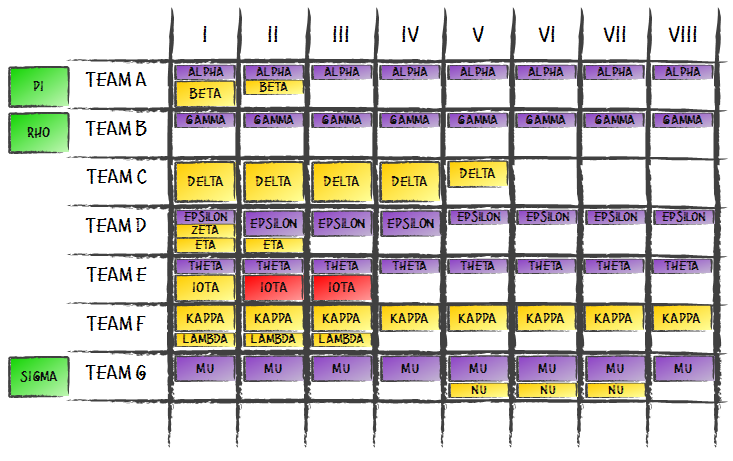
    First, there is no value stream or process in a way we understand it on a team level. Since the flow of index cards wasn’t dynamic I decided this isn’t information I should focus on that much.

    Second, on horizontal axis, instead of process there is a time line (monthly granularity). As variability of project sizes is huge I decided I need some sort of time boxes which I measure WIP against. With very few small engagements, ones that take us less than a few weeks, monthly time boxes looked reasonable.

    Third, I created swim lanes for teams. We don’t have 130 generic engineers, or Average Full-Time Equivalents, or whatever other inhumane label you can think of. We have teams that we strive to protect and teams do have specializations. It means the context of a team is very important and if it is important it goes to the board, thus swim lanes.

    Fourth, having such board construction I had to change my approach to index cards. Instead of having a single index card representing single project I ended up with territory-driven approach. A project covers a territory both in terms of team(s) and time. Looking at index cards with a project name you can instantly guess which team is working on the project and how long it’s going to take them. And the best part: a size of index card in any given month represents roughly how big part of a team would be involved in work on a project. This way we can easily show a few smaller projects as well as on big or any combination of those two.

    Fifth, as one of Kanban base concepts is pull it is represented by backlog area – green cards on the left side of the board. These are projects that aren’t yet started. The specific swim lane they are neighboring show preferable team to work on a project. However, it rarely is such a direct dependency: this team will do the project as there is no other one suitable to do the job. Most of the time we assume that another team can build the project too. Each time a project goes into development we decide, at last responsible moment, which team will take it.

    Of course there are some nice additional flavors here as well. Violet and yellow index cards differentiate maintenance projects from new ones. Green card are for projects that aren’t yet started and once they are we switch to yellow. Red index cards represent overrun in projects that are late. As we work on fixed price, fixed time projects we roughly know up front how much time and people we want to invest into a project. When something bad happens and this plan changes we show that. After all we put more attention to challenged projects.

    A simple fact that we are working on fixed time, fixed price projects doesn’t mean our arrangements never change. They do. Any time something changes we just update it on the board, same as we’d do with any other board. We just keep the board updated as other way its value would diminish.

    This Kanban board design definitely tells more than the initial one but I started this whole revolution to deal with WIP limits. What with them?

    Well, there still aren’t explicit WIP limits. However at this moment there are implicit WIP limits and information about them can be pretty easily extracted. Considering that I use territory-driven approach to index cards WIP limit is show by vertical axis of the board. Each team has a limit of one full-sized sticky note (representing whole team) per month which can be split in any way.

    In other words we won’t start another project unless there’s some white space that this project would fit into as white space represents our spare capabilities. Actually, it may be a bit of simplification as on rare occasions there are project we just start, no matter what. But even then we either can make such project fit the white space in a reasonable way or we need to make some more white space for it.

    Even though such WIP limits aren’t explicit, after some time of working with the board I can tell you they do the job. They do, not only in pulling new projects into development but also, and more importantly, in long-term planning as we have visibility a year ahead and can confront our capabilities with planned sales etc.

    With this board, for the first time from the beginning of my journey with project portfolio Kanban I felt satisfied.

    See how we come up to this point – read the whole story.

    Advertisement: Infragistics® NetAdvantage® for Windows Phone gives you rich, innovative mobile UI controls to build high-end mobile user experiences for Microsoft® Windows Phone®. Their high performance, eye-catching data visualizations, mobile form factor optimization, touch gesture support, and alignment with Metro usability guidelines take your social media connected mobile applications to the next level.


  • You Can Deliver Late

    It is a problem that never really goes away. You build your app and at the beginning everything seems to be as planned. Suddenly you realize you are late. For the sake of this post it doesn’t really matter whether late means 6 more months in 18-month long project or a day in a week-long sprint. Either way you realize you won’t make it.

    Then, people go crazy.

    Depending on team’s maturity you will notice a range of different behaviors. Anything from cutting corners on quality (“we have this buffer here we can use – it is called functional testing”), through abandoning best practices (“maybe we hit the window if we skip writing unit tests”), cheating client (“let’s deploy and we’ll be building the rest while they’re testing”), throwing features out (“oh, they are just saying it is crucial, they’ll manage without this feature and otherwise we won’t make it by the deadline”), to working team’s butts off beyond any limits (“hey guys, I know it’s the fifth weekend in a row, but we need to finish it and we aren’t anywhere close”).

    I have a question for you: how often do you consider being late as a viable option?

    My wild-ass guess answer: way too rarely.

    I mean, how many times in your life have you worked on a system that really had a deadline written in the stone? How many times there would be deadly serious consequences for your users and/or clients if you were late. Not tragically, hopelessly, beyond-any-recovery late, but simply late. Like a day every couple of weeks or a month every year.

    Personally I worked on such project only once. We were adjusting ERP system to new law after Poland joined EU. Deadline: May 1, 2004.

    Guess what. We were late. A week. And then, like hours after we released we found a bug which basically got medieval on the database. Almost another week to publish a hotfix that made the software usable again. And you know what? Nothing happened. The sun rose again, the moon was there at night, we didn’t lose our jobs, and our clients didn’t lose theirs. It was OK.

    It was OK, even though we missed the deadline that actually was written in the stone.

    Well, if we missed it by a couple of months we would probably be out of business but still, a couple of weeks were sort of acceptable.

    You can miss your deadlines too. They aren’t going to kill you for that I guess. And yes, I am well aware that being a supervisor of a dozen project teams it is unlikely that I am expected to state such opinions so openly.

    Yet still I believe that the price we pay for being on time when it can’t happen on reasonable terms more often than not is bigger than any value we might get by hitting the window. And talking about price I think about dollars, euros or whatever currency is on your paycheck. Actually most of the time we pay for decisions mentioned at the beginning of this post long way after the deadline passed. We pay in maintenance cost, we pay in discouraged users that can’t really use the app, and we pay in burned-out teams.

    So next time you’re going to make your call, consider this: you can be late. Even more, most of the time, being late is fairly OK.

    Advertisement: Infragistics® NetAdvantage® for jQuery expands the reach of your web applications by using the NetAdvantage jQuery controls that are cross browsers, cross platforms and cross devices supported. This fully client-side JavaScript & HTML5 based toolset is equipped with Line of Business UI applications needs with rich interactive dash boarding charts in HTML5.


  • The Project Portfolio Kanban Story: Why Standard Board Design Is Not a Good Choice

    When I was starting my journey with Kanban on project portfolio level I based on a classic board design I knew from my work with Kanban within project teams. I basically tried to map value stream to the board but on a different level.

    The effect was sort of predictable.

    Portfolio Kanban Board 2

    It was also naive.

    The basic strength of such design is it’s very intuitive. Well, at least for these parts of the world that read from left to right. The same way we read the board: whatever is closer to the right edge of the board is closer to completion. The value stream we map may be a bit simplified (as me make it linear) but then it isn’t that much of a problem – after all index cards are flowing through the board pretty smoothly.

    Unless you put on single index cards “tasks” that last a year or more, which is exactly what I have done.

    When you’re looking at very long lasting projects you look for different information than in case of several hour long tasks. It isn’t that important how an index card is flowing through the board. After all you expect it to sit in one place for months. If you find out that the status of the index card has changed a few days late it likely isn’t a problem at all.

    It is way more important, and interesting at the same time, to see teams’ capabilities in terms of undertaking new projects, i.e. how much more we can commit to our clients. Note: we aren’t talking about a single team of 7 (plus or minus 2). What we have here is 100+ people working on a couple dozen different projects concurrently. At this level capabilities are pretty damn difficult to estimate, especially given ever-changing business surroundings.

    This is a huge weakness of the common board design: it doesn’t really help you with estimating free capabilities. It would help if we were able to set reasonable WIP limits on such board. Unfortunately, it is (close to) impossible.

    A number of projects isn’t a good candidate to measure WIP, as projects differ in size hugely. If you use time-boxing you could try using a number of time-boxes as a measure. However in this case you don’t want to have a random team working on thirteenth iteration of a project that was build so far by the other team. With WIP limits measured by the number of iterations you would likely end up this way. Another idea was using money-related measures. This brings a question whether you sell all your work for the same prices. I guess that is true in very few cases and definitely mine is not one of them.

    The longer I thought about it the more often I was coming back to people. I mean a team could start another project if they had some free people who could deal with it in planned/expected time frame. I even thought for a moment of setting base WIP limit around 130 (roughly a number of people working on projects represented on the board) and having each index card to weigh as much as there were people involved in a project at the time. The problem was the hassle needed to manage such board would be horrifying.

    On the other hand measuring WIP in number of teams was way too coarse-grained as we had anything from multiple projects covered by a single team to multiple teams working on a single project.

    All in all I ended up with a belief that, in terms of project portfolio Kanban, standard board design isn’t a good choice. I was ready to redesign the board completely.

    If I piqued your interest read the whole project portfolio Kanban story.

  • How Much Work In Progress Do You Have?

    One of common patterns of adopting Kanban is that teams start just with visualization and, for whatever reasons, resist applying Work In Progress limits at the very beginning. While, and let me stress it, resignation from introducing WIP limits means drawing most of improvement power out of the system I understand that many teams feel safe to start this way.

    If you are in such point, or even a step earlier, when you’re just considering Kanban but haven’t yet started, and you are basically afraid of limits I have a challenge for you. Well, even if you use WIP I have the very same challenge.

    First, think of limits you might want to have.

    Second, measure how the tasks flow through your process. It’s enough to write down the date when you start working on a task and the date when you’re done with it – the difference would give you a cycle time.

    Third, after some time, check how many tasks in progress you really had every day. In other words: check what your WIP was.

    Odds are you will be surprised.

    One of my teams followed the “let’s just start with visualization and we’ll see how it goes” path. We even discussed WIP limits but eventually they weren’t applied. It is a functional team of 4 that juggles tasks which are pretty often blocked by their “clients,” i.e. beyond team’s control. The process, besides backlog and done bucket, is very simple: there’s only one column – ongoing.

    The discussion ended up with the idea of limit of 8, considering there are some rather longish tasks mixed with quite a few short but urgent tasks, e.g. “needs to be done today” sort, and of course there are frequent blockers. In other words rough limits two tasks per person should account for all the potential issues.

    As I’ve mentioned, WIP limits weren’t initially set. Even the WIP limit of 8 looked too scary at that point. After a few months we came back to the discussion. Fortunately, this time we had hard data from a hundred days.

    Guess what the worst WIP was.

    Seven. Over the course of a hundred days there wasn’t a single case that the scary limit of 8 was reached, let alone violated. What more, there were only 5 days where limit was higher than 6. In other words setting the limit of 6 and keeping it would be no sweat. A challenge starts at 5, which sounds very reasonable for such team.

    All of that considering that each and every blocked item was counted within the limit as at the moment the team doesn’t gather the data to show how long a task remains blocked.

    The lesson I got was that we can and should challenge our WIP limits basing on historical data. How often we hit WIP limits. How often we violate them. If it appears that we have enough padding that we barely scratch the ceiling on rare occasions it is a time to discuss reducing WIP limits. After all, it might mean that we are pursuing 100% utilization, which is bad.

    If WIP limits are barely and rarely painful, they aren’t working.

  • What Is Slack Time For?

    Jurgen Appelo recently touched the subject of slack time discussing what kind of tasks are supposed to be done in such time slots.

    First thing that I find disputable is reducing slack time to mere padding: “I expect the task to be done in 1,5 hours but to be perfectly safe I’ll start it 3 hours earlier so I can deal with unexpected difficulties.” I guess I’m way closer to Marcin Floryan’s comment under the post. Anyway, that’s not what raised my biggest concerns.

    I don’t agree with Jurgen on what slack is, or should be, for. Jurgen points that when we think about important things, like improvement, refactoring, learning and brushing teeth, we should actually plan for that and not hope that there will be enough slack time to have all of them done somehow. After all, we know that hope is not a strategy. Well, at least not a good one.

    First, I see it a result of a simplified view of slack time. Actually, with Work In Progress limits set properly I can expect to have pretty stable amount of slack time over time. The thing I can’t predict is when exactly it will happen and who exactly will hit the limit and will be granted free slot. However, lucky me, statistics is on my side – the slack time distribution should be pretty fair over time.

    I say “pretty fair” as when I have a very stable process, which software development is not by the way, I will likely face the situation that people who work on bottleneck part of the process won’t get slack time at all. Fortunately software development is really far from being “very stable” and even if it was we would still be able to deal with the situation using different means, e.g. the way Jurgen proposes.

    Second, I actually think that slack is a perfect tool to be used against important but not urgent tasks. Improvement and learning definitely fall into this category. Refactoring may or may not, depending on a software development approach you use. And brushing teeth? Well, unless you accept the fact you’re killing colleagues with your poisonous breath I would treat it as important and urgent.

    Yes, it means that I accept the fact that we may not spend any minute improving or learning (consciously) for some time. Considering my WIP limits are reasonable such situation would happen if and only if a team is perfectly balanced, our productivity keeps super-stable and there are no non-standard cases. Um, have I just said it is impossible not to have slack time? Oh, well.

    Of course there is another situation: too loose or no WIP limits at all. And yes, in such case planning tasks, which would normally be done during slack time slots, is one of ways to go. But definitely not the only one! And not the most effective one either!

    Actually planning improvement, learning, etc. tasks is just adding additional work items to your project. It doesn’t make you more flexible. Pretty much the opposite.

    Simply adding “empty” slack time slots, which can be filled by a specific task which, at the moment, seems most reasonable can be a more effective approach.

    You can do even better though. If your system natively introduces slack time these empty slots will appear not when someone arbitrary says so, but exactly when it is optimal for the system, i.e. when adding another regular task would overcrowd the flow, thus harm the productivity.

    With such approach I believe slack time is actually the right place for important stuff.

    Actually if a task is simply optional I would likely advise not to do it at all. After all, why add the complexity which isn’t needed. Isn’t everything around complex enough? Thus I don’t consider slack time a tool to be used to do optional stuff.

  • A Myth of 100% Utilization

    Do you remember your very first job? A junior software developer or a quality engineer. An intern maybe. You were expected to do something. All the time. I mean someone paid you and wanted to keep you busy. You didn’t see a big picture. You just had a queue of tasks you should do. One after another. Like building a brick wall. Brick by brick. Done with one? Here’s another.

    More interesting question is: has it changed over years? I mean you probably changed the role a few times, possibly went through a handful of companies. Odds are you see a big picture now. Or at least a big part of a big picture. Maybe you’ve grown to be a leader or a decision maker. Maybe even things are under your control.

    Nevertheless I’m still interested: whether you or your bosses still expect people to be busy doing the project tasks all the time?

    I guess this is true for vast majority of organizations. We still build brick walls. Brick by brick. Done with one, here’s another. Why bother, you ask.

    Well, this approach means basically aiming to have all the people doing something, for the sake of this post let’s call it “project tasks,” all the time. It means aiming for 100% utilization of people. And you know what? If you aim for 100% utilization you’re likely to get pretty damn close to it.

    The problem is we don’t get paid for being fully utilized. We get paid for delivering projects (again, please let me go with such a generic word).

    Thus, we should be aiming for effective and optimal deliveries and not for having everyone around busy.

    And there the fun begins.

    Intuitively we follow the way of thinking which tells us that we do most work when everyone actually is doing work all the time. Finished with one feature? Go, start another. The project will end faster.

    Except it isn’t true.

    We don’t do simple manual work. We don’t build a brick wall where each and every task of adding another brick is similar, simple and almost completely independent of other tasks. And most of all it can be done without much, if any, cooperation with others.

    There are a few areas where 100% utilization hits us hard.

    Context switching

    This is an obvious statement but switching context comes at a cost. I guess we always perform better when allowed to complete one thing uninterrupted before starting another and the nature of task doesn’t matter here. However, when we think of knowledge work there’s another cost we pay – time we need to get at full speed back again. Time to get into the context of the task. It’s not just another brick which we don’t even think of as our hands do the entire job.

    100% utilization means basically more tasks being done concurrently, because we want to have so much work started that everyone has something to do. It means that tasks are waiting for people. It means that quality engineers have enough developed features to test that they’re never idle and so on.

    OK, but what happens when someone finds a bug? Well, a developer switches back to this feature and fixes it. Then they’ll go back to this new feature they’ve been working on. In the meantime the quality engineer started working on something else and now they need to come back to this issue to retest it. Another context switch. Now, multiply it by a big number and that’s what is happening in many software development teams. Constant context switching, sometimes to work items which were waiting so long that people barely remember what they were all about.

    It costs. Each time probably just a bunch of dollars, but multiplied by a number of such situations it stacks up to huge piles of money.

    Task juggling

    Another problem which comes with having tasks waiting for free people on every stage of the process is that we have lots and lots unfinished work. It means significantly bigger coordination effort you need to invest to keep you machinery working. It means way more prioritization work as every now and then people need to decide what to next. After all they are choosing among a number of different options.

    It might surprise you but prioritization can take a huge toll in terms of time consumption. Let’s go with a simple experiment: prioritize whether you prefer to drink or pee at the very moment. It was quick, wasn’t it? Now, prioritize importance of each and every thing which lies on your desk. How much longer the second task took you?

    Many ongoing features usually also means that you add cost attached to all the product politics. If there are many decision on priorities during the whole process it means there’s a temptation to change these priorities so team members start attending meetings or having discussions where they are told to add this little gizmo to the next release as it will allow conquering the whole world. No! Not the world, the whole galaxy! Now, imagine you could just avoid all that and focus on value-adding work. How happy you would be.

    Time to market

    This one is tricky. If you asked any decision maker whether they want to have shorter time to market they would eagerly agree. However, pretty often shorter time to market bears not that much value. Think of fixed priced custom project for a big client. Even if you can release per feature or you can deploy a new version weekly, chances are good they won’t touch it, even with a stick. And if you deliver the whole solution a month earlier than planned they won’t have capabilities to run user acceptance tests, thus you’ll wait anyway.

    However, there are project where shorter time to market has huge value. Ask almost any web based app targeted directly to end users. In such cases longer lead times are actually counted in dollars.

    Early issue discovery

    Although personally I think this one is overhyped it can’t be omitted. If there’s a problem in your process there’s big value in discovering it as early as possible. Think of broken deployment. If you wait until you deploy the huge product at the very end of the project you are screwed up. However, if you care to deploy first bunch of features as soon as it is possible and reasonable, you discover the issue early, sort it out and eventually live through the final deployment with little or no problems.

    On a side note: why do I think this one is overhyped? Well, if I hear examples of sending mass snail mails, you know, printing some papers, putting them into envelopes, sticking stamps and so on I wonder what can go wrong with such process. Yeah, envelopes can have wrong color. Wouldn’t I notice it instantly? Hopefully our teams know at least part of their craft at this level as we do mailing.

    OK, either way there are quite a few places where we actually pay for 100% utilization. The result is that with the very same team we deliver later when they’re fully utilized than we would if they weren’t.

    I know, this is counterintuitive.

    It also means that avoiding 100% utilization means that we can build our projects cheaper.

    I know, this is counterintuitive.

    Actually, it means that letting our people do nothing on occasions means that we can perform better. And I mean nothing like, well, virtually nothing.

    I know, this is counterintuitive.

    The funny thing is we aren’t that surprised when we think about a highway. When we pack as many cars into highway as it is possible (100% utilization) we expect to see a traffic jam. And that’s what happens. We’ve been there. We’ve seen that. We expect nothing different. Then it is intuitive. Maybe because we’ve experienced that.

    Maybe we should give ourselves a chance to experience it in our projects as well?

    And yes, we can do better than let people doing nothing when they don’t do project work. But that’s a subject for another post.